- The paper presents a dataset of over 86,000 question-answer pairs derived from mobile app screenshots to facilitate automated screen comprehension.
- It employs an extractive question answering approach with flexible evaluation metrics such as normalized DCG and average F1 score for performance benchmarking.
- The methodology integrates a multi-step annotation process and quality control measures to enhance UI understanding and advance HCI applications.
Large-Scale Question-Answer Pairs over Mobile App Screenshots
The paper presents ScreenQA, a new task and dataset aiming to facilitate automated comprehension of screen content through question answering mechanisms. ScreenQA addresses the relatively unexamined area of screen content understanding, distinct from navigation or structural analyses, by releasing a publicly available dataset containing 86K question-answer pairs labeled over mobile app screenshots. The dataset is based on the RICO dataset and focuses on extractive question answering tasks to benchmark screen comprehension capabilities, providing valuable resources for advancing screen UI technologies and HCI development.
Introduction to ScreenQA
ScreenQA bridges the gap between UI component-level understanding and higher-level functional analyses by leveraging the RICO dataset for generating question-answer pairs. More than 86,000 pairs are annotated to test screen comprehension capabilities effectively, without exhaustive questioning but sufficient for benchmarking. Efficient screen state comprehension is essential for task automation and developing agents capable of eyes-free user experiences. Understanding screen content is fundamentally akin to reading comprehension in NLP but tailored to artifacts created for visual consumption by humans.
Ideas from SQuAD and other vision-language multimodal domains inform the approach. ScreenQA emphasizes the language heavy nature of screens, integrating icons and symbols while steered by text for necessary decluttering. It provides a foundation for investigating challenges shared across visual-heavy domains while accommodating the spatial organization of UI elements, enabling reliable extraction without demanding hierarchical input like view structures.
Problem Setting and Challenges
Problem Statement
The core of the ScreenQA task is answering questions based on relevant UI elements within a screenshot. When the screenshot fails to contain answers, the system should return <no answer>. Candidates of answers from the UI elements are ranked by relevance or reading order across semantic groups rather than simple coordinate-based sorting, prioritizing human-like evaluation metrics to ensure semantic coherence.
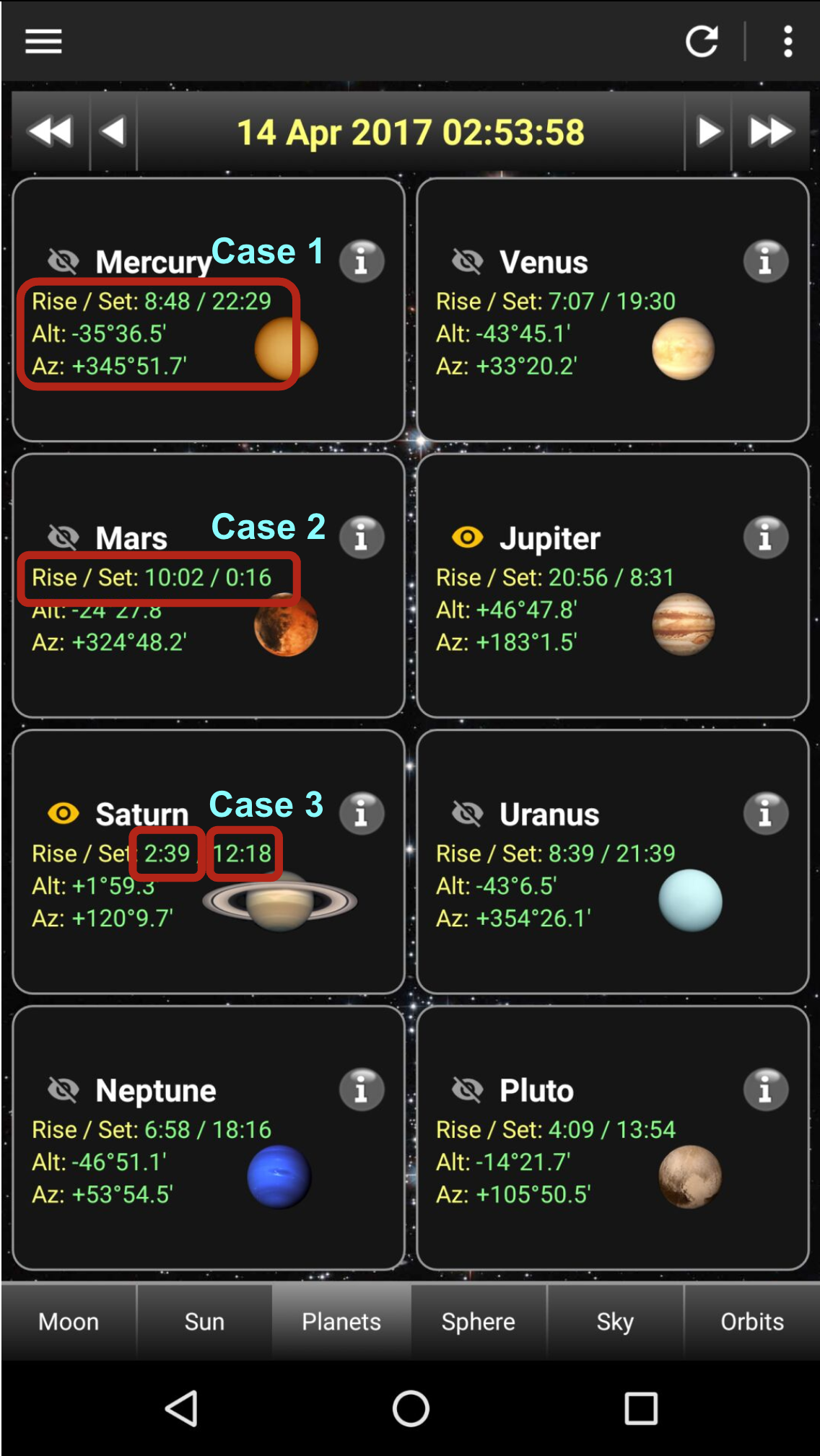
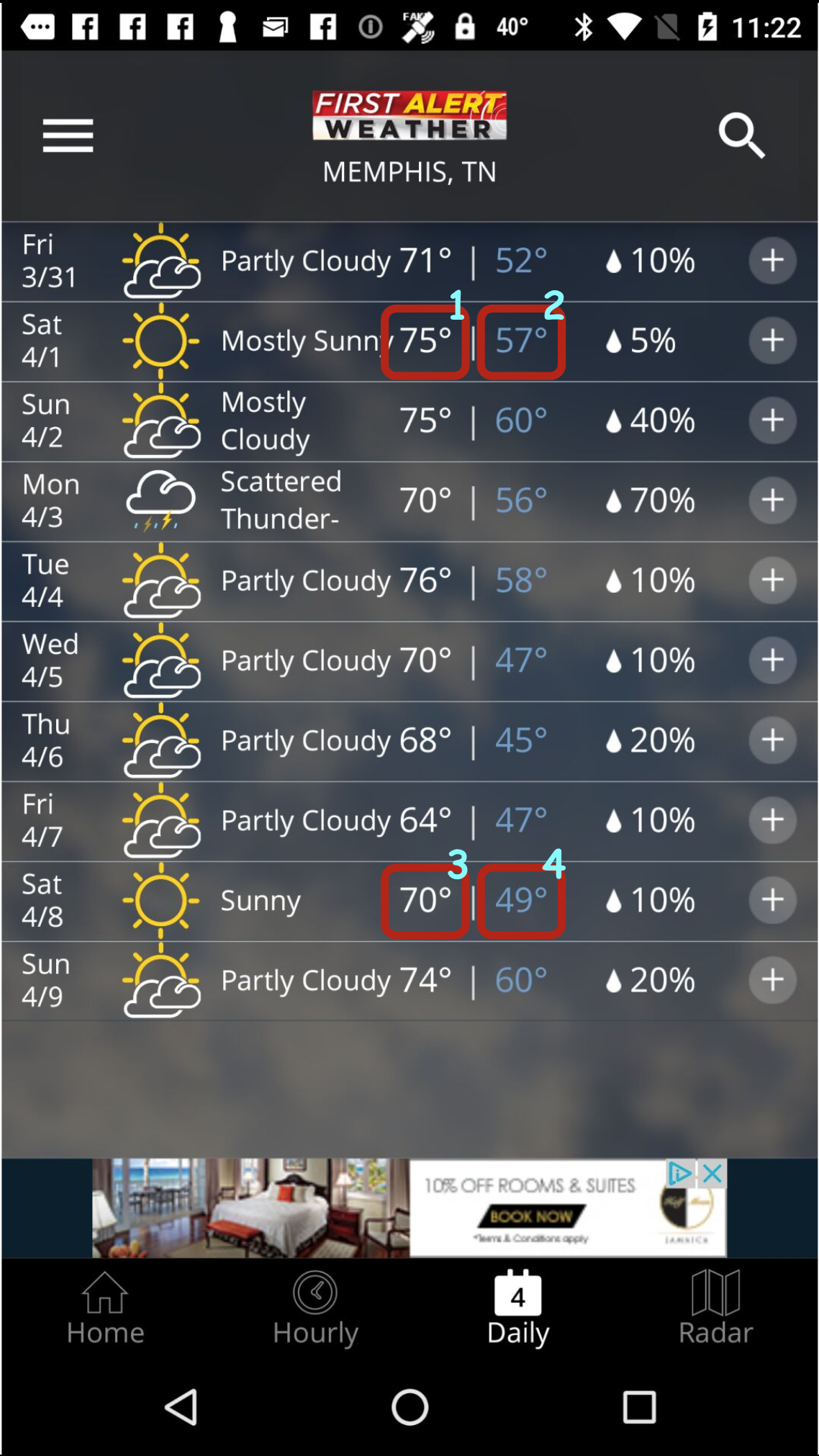
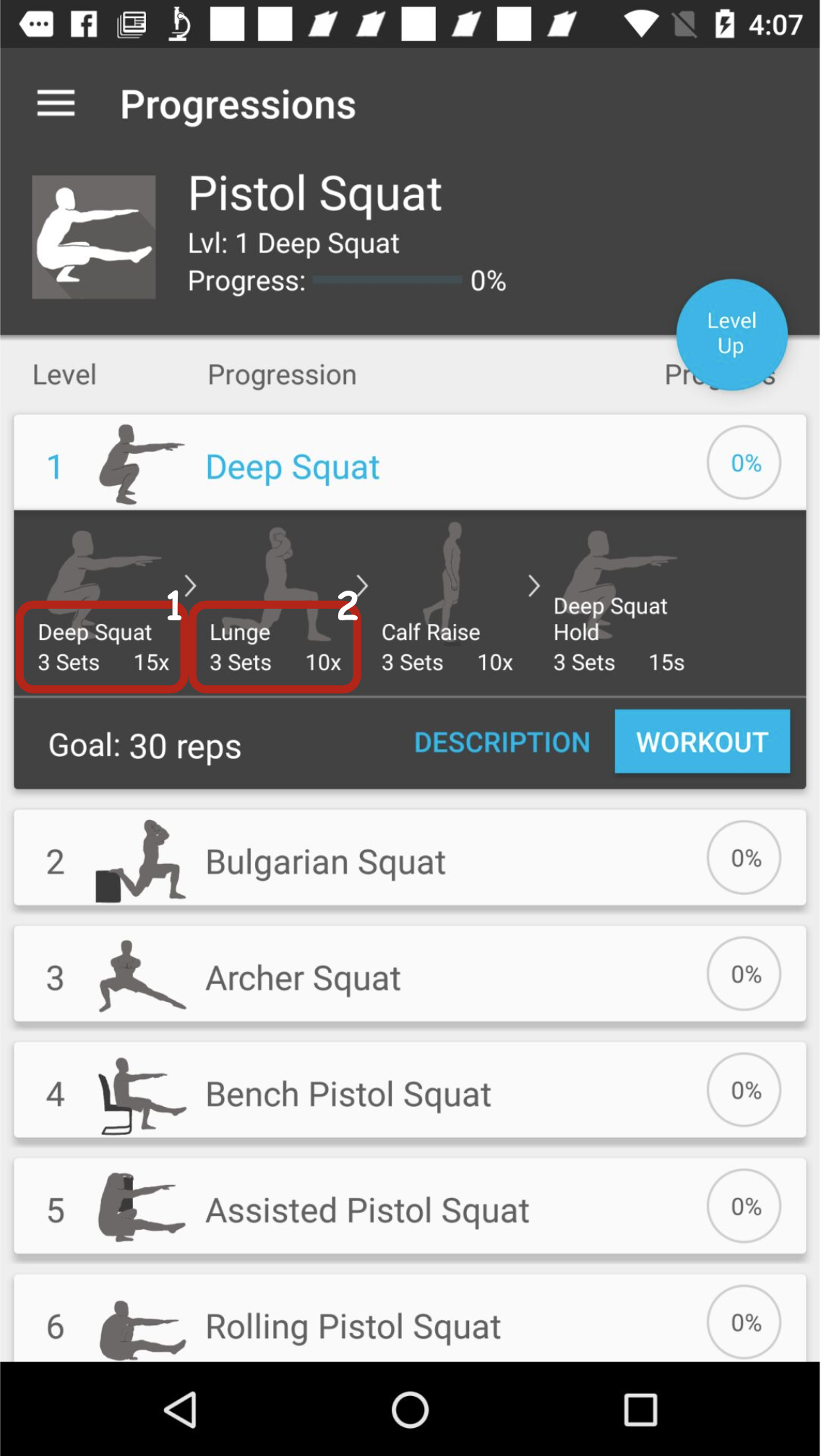
Figure 1: Three possibilities annotated for ambiguous UI element boundaries, highlighting boundary determination challenges.
Distinguishing key factors for defining screen comprehension tasks includes addressing ambiguities and employing flexible evaluation metrics. Diverse UI structures necessitate omitting view hierarchy dependencies, deterred by artifacts like overlays or the web view, stoking a purely pixel-derived comprehension akin to human ground assessments. Embracing state-of-the-art evaluation measures and simplifying metrics facilitates manageable assessments, avoiding exhaustive permutation complexities though remaining sensitive to hierarchy dynamics.
Evaluation Metrics
Two prominent metrics are leveraged: average normalized Discounted Cumulative Gain (nDCG) and average F1 scores. Each metric is defined against predicting answers within Task specifications, treating answer lists as calculative units for metrics, offering nuanced insight beyond the conventions of precision-recall or mean average precision models. Implementing an adaptive ideal-based scoring balances evaluations across varying answer lengths, supplementing impactful evaluations reflective of user needs during benchmarks.
Answer Matching
To address ambiguity from UI element selection discrepancies, an empirical approach delineates subunits within answers for assessment compatibility. This adaptive procedure wraps evaluations without needless permutation complexities while appreciating spatial nuances in screens, tailored to ensure reliable relations between predicted and actual segments for coherent assessments.
Annotation Process
The annotation workflow integrates a multi-step methodology for filtering and annotating data, coupled with quality assurance strategies to establish reliable dataset credentials.
Pre-filtering
Screenshots were preliminary filtered for language relevance and synchronization with accompanying view hierarchies, directed by data noise reduction protocols. Human annotators were instrumental in flagging out-of-sync examples, focusing primarily on main content areas while ensuring view hierarchy consistency.
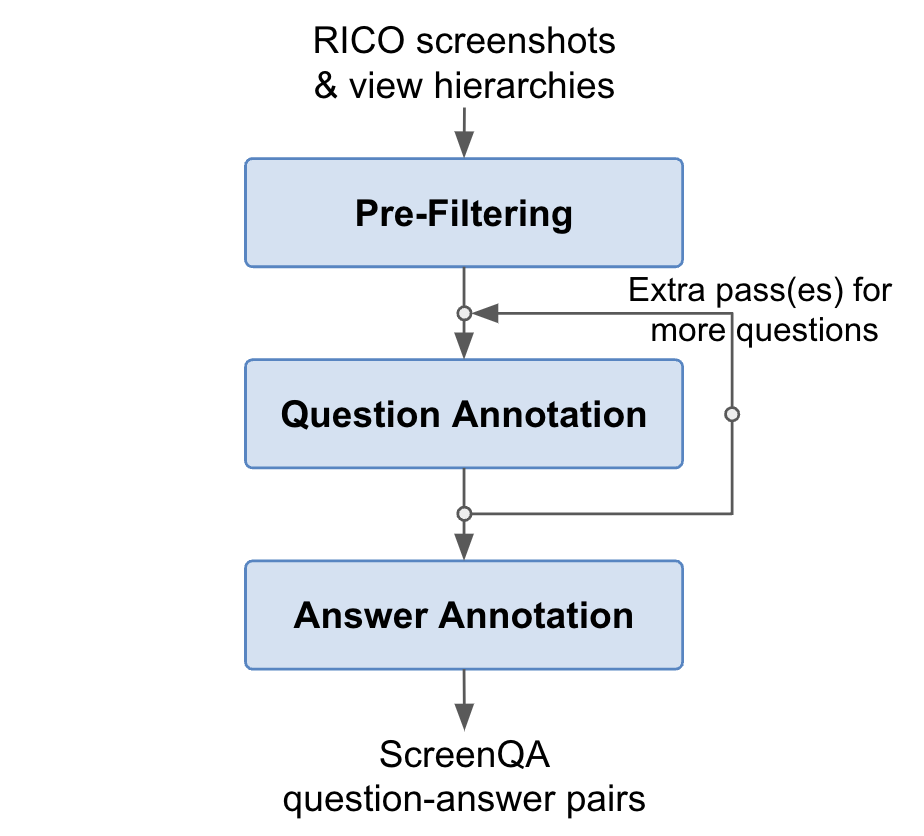
Figure 2: Demonstrates the ScreenQA annotation process.
Question and Answer Annotation
A multi-layered annotative method emphasized diverse question structures, avoiding exhaustive queries or logical reasoning requirements. Annotators were tasked sequentially to frame questions contextually while observing grammatical consistency. Supplemental answer annotations included selecting response bounding boxes and prioritizing logical coherence among responses.
Dataset Statistics
Screen QA's released database details the division into train, validation, and test sets across approximately 51k screenshots, offering robust coverage across conceivable UI scenarios while upholding high standards for example validity.
Implications and Future Directions
ScreenQA's design asserts a promising methodology for advancing automated screen content understanding by integrating novel dataset frameworks with flexible evaluation strategies. The dataset's availability presents an opportunity for broad cross-disciplinary application, paving the way for developments in machine learning paradigms, optimized for multimodal analytics.
Conclusively, ScreenQA anticipates benefits beyond UI-centric applications into broader vision-language domains, emphasizing layout and content integration accuracy. Applications are poised to reshape explorations into automatic screen analysis by promoting responsive multimodal learning models yielding higher comprehension fidelity.
In acknowledging prior setups and conveying data quality benchmarks, future refinements could ensure composite problem integration, capitalizing on dynamic screen interactions naturally embedding complex task syntheses within screen comprehension models.
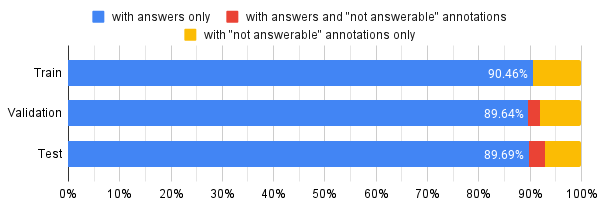
Figure 3: Distribution showing the fraction of questions with answers and unanswerable questions, contextualized with validation splits.
Through screen UI exploration, the paper contributes toward foundational evolutions in UI and HCI fields, inspiring avenues for extended practical applications reflective of everyday screen handling challenges.
In summary, ScreenQA provides instruments for the next wave of advancements in screen comprehension, bolstered by the evaluated dataset that flourishes on comprehensible quanta instrumenally tethering responses to structured screen documentation paradigms.