UI2Code$^\text{N}$: A Visual Language Model for Test-Time Scalable Interactive UI-to-Code Generation
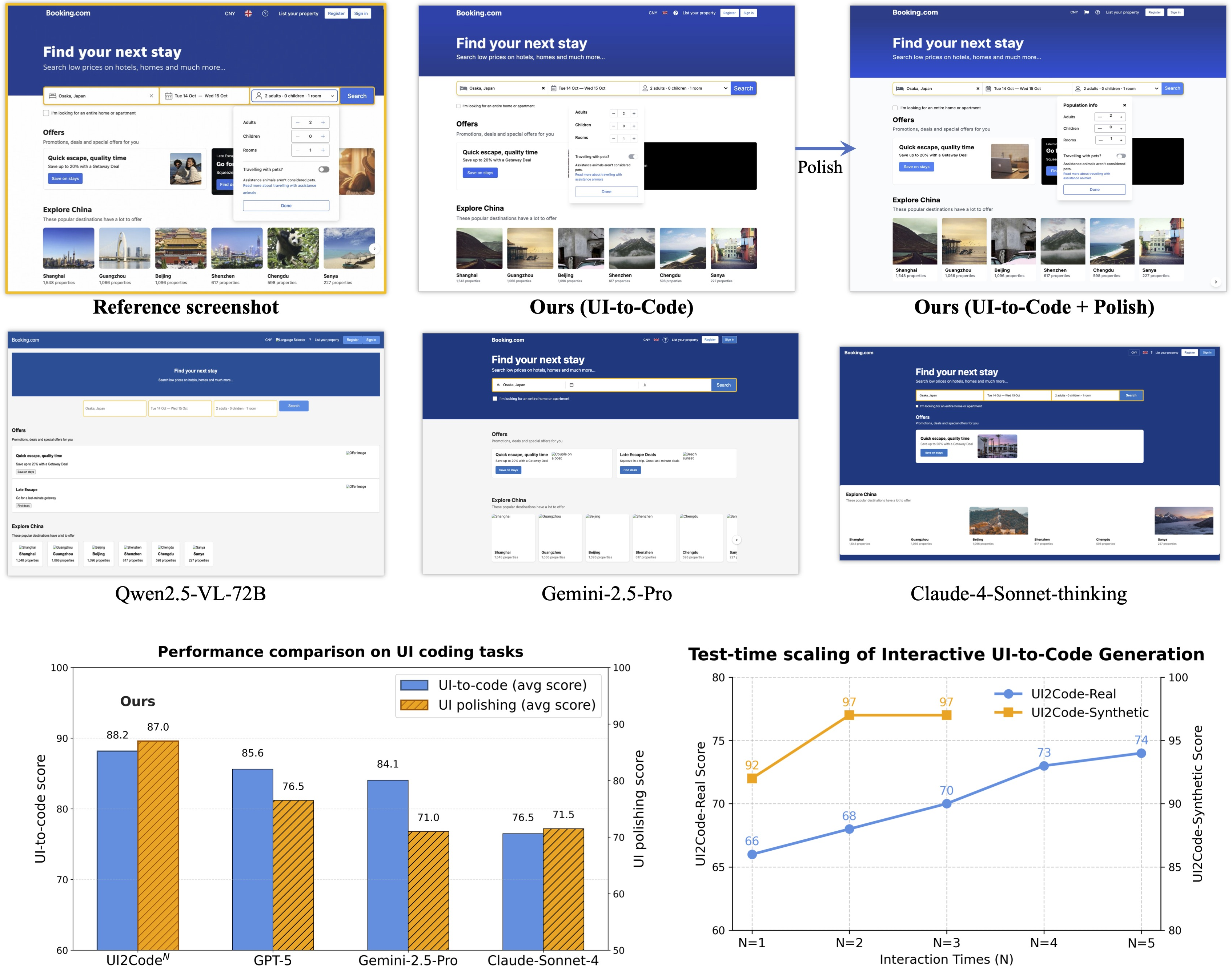
Abstract: User interface (UI) programming is a core yet highly complex part of modern software development. Recent advances in visual LLMs (VLMs) highlight the potential of automatic UI coding, but current approaches face two key limitations: multimodal coding capabilities remain underdeveloped, and single-turn paradigms make little use of iterative visual feedback. We address these challenges with an interactive UI-to-code paradigm that better reflects real-world workflows and raises the upper bound of achievable performance. Under this paradigm, we present UI2Code$\text{N}$, a visual LLM trained through staged pretraining, fine-tuning, and reinforcement learning to achieve foundational improvements in multimodal coding. The model unifies three key capabilities: UI-to-code generation, UI editing, and UI polishing. We further explore test-time scaling for interactive generation, enabling systematic use of multi-turn feedback. Experiments on UI-to-code and UI polishing benchmarks show that UI2Code$\text{N}$ establishes a new state of the art among open-source models and achieves performance comparable to leading closed-source models such as Claude-4-Sonnet and GPT-5. Our code and models are available at https://github.com/zai-org/UI2Code_N.
Paper Prompts
Sign up for free to create and run prompts on this paper using GPT-5.
Top Community Prompts
Explain it Like I'm 14
Overview
This paper is about teaching an AI to turn pictures of app or website screens (UIs) into working code, and to improve that code step by step using visual feedback. The authors built a model called UI2CodeN that doesn’t just create code once and stop—it can also fix mistakes, polish the look, and make edits based on instructions, much like a real developer working with a design.
What questions were the researchers trying to answer?
They focused on three simple questions:
- How can an AI reliably turn a screenshot of a user interface into high‑quality, working front‑end code (HTML/CSS/JS or similar)?
- How can the AI use visual feedback (what the code looks like when rendered) to improve its result over multiple rounds, like a human developer?
- How can we train such a model well when real webpage code is messy and synthetic (fake) data is too simple?
How did they do it?
The researchers introduced both a new way of working and a new way of training.
The interactive way of working (three abilities)
Instead of “one try and done,” the model works in an interactive loop:
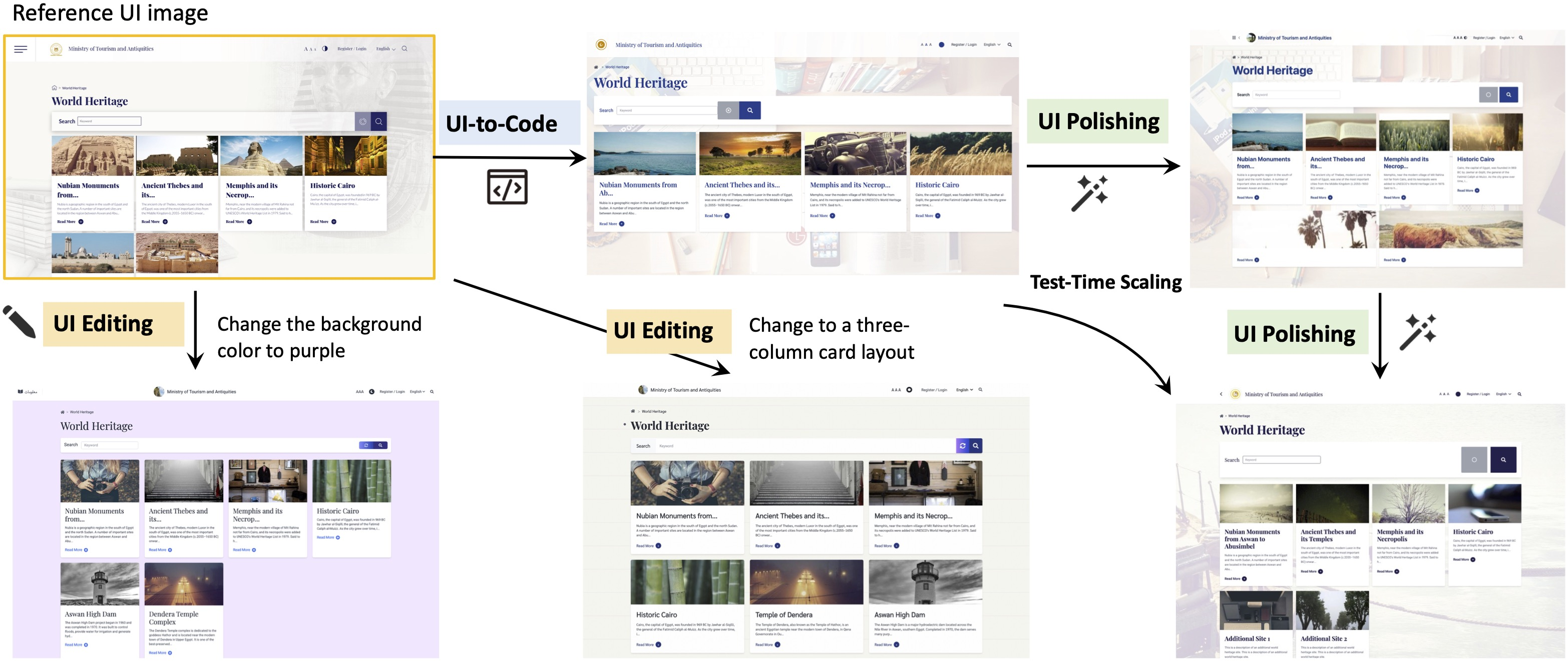
- UI-to-code: Given a screenshot, the model writes a first draft of the page code.
- UI polishing: The model looks at the target screenshot, the code it wrote, and a rendering (a picture of what that code looks like). Then it tweaks the code to make the rendering look closer to the target. You can repeat this polishing multiple times.
- UI editing: The model can make specific changes to an existing design based on instructions (like “change the colors” or “add a button”).
Think of it like writing an essay: you draft, compare with the requirements, and revise until it looks right.
The three-stage training recipe
Training a model for this is hard because real web pages are complex, and fake data is too clean. So they used a 3-step approach:
- Stage 1: Pretraining on lots of real webpages
- They collected millions of page screenshots with corresponding HTML. Even if that data is noisy, it helps the model learn how real UIs look and how code maps to visuals.
- Stage 2: Supervised fine-tuning (SFT) on clean, curated examples
- They built high-quality examples that teach the model to follow instructions and produce neat, consistent code (including polishing and editing tasks).
- Stage 3: Reinforcement learning (RL) with a “verifier” judge
- After the model produces code and a rendering, a separate strong vision-LLM (the verifier) acts like a judge: it compares the rendering to the target screenshot and gives a score.
- The model then learns to write code that gets better scores, just like practicing with feedback from a coach.
- To be fair when comparing many candidates, the verifier uses a “tournament” style comparison (round-robin) so the best option rises to the top.
Test-time scaling (improving with more polish rounds)
Because the model can polish iteratively, you can trade a bit more time for better results. Running extra rounds of polishing usually improves the match to the target design. The authors show that performance keeps climbing over several rounds, especially on real, messy webpages.
What did they find?
Here are the main takeaways from their experiments:
- Stronger than other open-source models: UI2CodeN sets a new state of the art among open-source models on multiple UI-to-code and UI-polishing benchmarks.
- Competitive with top commercial systems: It reaches performance similar to leading closed-source models on several tests.
- Polishing really helps: Repeating the polish step boosts quality at test time. In their studies, a few rounds could deliver around a 12% improvement on tough, real-world pages.
- Better rewards lead to better learning: Using a smart verifier (a strong vision-LLM that compares images) for the RL reward works better than simple image similarity scores. The “tournament” comparison gives more stable, fair feedback.
- Real data matters: Including real webpages during RL (not just synthetic examples) improved results on real-world benchmarks, helping bridge the gap between clean training data and the messy real internet.
Why does this matter?
- Closer to real developer workflows: Real UI building is iterative—draft, view, compare, adjust. This model mirrors that process, making it more useful in practice.
- Faster, cheaper front-end work: Automating large parts of UI coding could speed up app and website development, reduce costs, and help more people create software.
- A blueprint for training coding AIs: Their full recipe—pretrain on real data, fine-tune on clean data, then refine with RL and a strong verifier—could guide future tools for other code-from-image tasks.
- Practical reliability: The ability to polish and edit makes the system useful not just for first drafts, but also for fine-tuning to match a design closely.
In short, UI2CodeN shows that letting an AI see, code, check its own work, and keep improving brings it much closer to how humans craft high-quality user interfaces.
Knowledge Gaps
Knowledge gaps, limitations, and open questions
Below is a single, concrete list of what remains missing, uncertain, or unexplored in the paper. Each item is framed to enable actionable follow‑up work.
- Evaluation metrics: Reliance on VLM-based scoring (often GLM-4.5V) without a large-scale human evaluation study to validate metric alignment and reliability across diverse UIs, code styles, and browsers.
- Metric circularity: The same or closely related VLM family is used as reward/verifier and as evaluator, risking circularity and overfitting to verifier preferences; no cross-verifier or cross-metric triangulation reported.
- Reward hacking risks: No analysis of whether the generator learns to exploit verifier weaknesses (e.g., background colors, overlays, or superficial layout mimicry) that inflate scores while harming code semantics, accessibility, or maintainability.
- Functional correctness: Benchmarks focus on visual fidelity; absence of systematic testing for interactivity (event handlers, form behavior, navigation, responsiveness) and DOM semantics.
- Accessibility compliance: No evaluation or constraints for WCAG/ARIA, keyboard navigation, alt text, color contrast, or semantic HTML—critical for production-ready UIs.
- Cross-browser/device robustness: No assessment of fidelity and behavior across browsers (Chrome, Firefox, Safari, Edge), rendering engines, or devices (desktop/mobile/tablet, DPI scaling).
- Responsiveness and layout adaptability: Generated code is not evaluated for responsive design (media queries, flex/grid behavior) under viewport changes or device classes.
- Code quality and maintainability: No measurements of readability, modularity, CSS organization, duplication, dead code, or adherence to common front-end engineering practices.
- Framework diversity: Outputs appear to target single-page HTML/CSS; open question on generalization to modern frameworks (React/Vue/Svelte/Tailwind/Bootstrap) and component-based architectures.
- UI editing evaluation: Editing is described, but there is no dedicated, quantitative metric for targeted edit success (addition/deletion/replacement/adjustment) with structural diffs and localization of changes.
- Structural fidelity: Visual matches are reported, but no constraints or scoring for structural alignment (DOM hierarchy similarity, semantic tags, component boundaries) beyond appearance.
- Data release and reproducibility: The 10M crawled corpus and RL data details (URLs, licenses, cleaning rules, render environment, seed lists) are not specified for reproducible construction and legal compliance.
- Licensing and ethics: No discussion of copyright, privacy, and license status of crawled pages/screenshots or mitigation of sensitive content, which impacts dataset openness and ethical use.
- Pretraining ablations: Lack of ablation on continual pretraining choices (GUI referring expressions vs whole-page generation, code-context mix, VLM task mixture) to quantify each component’s contribution.
- RL stability: GRPO is run without KL/entropy regularization; no analysis of stability, mode collapse, or drift (e.g., degrading code quality while improving verifier scores).
- RL sample efficiency and cost: Round-robin comparator is O(N2) in verifier calls; no alternatives (pairwise sampling, Plackett–Luce models, learned surrogate scorers) or cost-quality trade-off analysis.
- Test-time scaling policy: Polishing rounds N are fixed; there is no adaptive stopping criterion, confidence estimate, or policy learning to optimize the quality-cost frontier per instance.
- Failure mode analysis: No qualitative/quantitative breakdown of typical errors (font mismatches, spacing drift, complex nested grids, dynamic content, iconography) to guide targeted improvements.
- Dataset contamination: No assessment of potential overlap between training and benchmark pages (Design2Code, Flame-React, Web2Code), which could inflate results.
- Render environment standardization: Absent specification of fonts, user agent styles, DPI, OS, and browser versions used for rendering during training/eval, making replication and fairness uncertain.
- Generalization to dynamic pages: Real-world sites often rely on external assets and JavaScript; the approach’s effectiveness on dynamic, dependency-heavy pages remains unclear and unevaluated.
- Multilingual and RTL UIs: No experiments on non-Latin scripts, right-to-left languages, or locale-sensitive layouts that stress text rendering and bidirectional layout logic.
- Security considerations: No checks for unsafe code patterns (inline scripts, external untrusted resources), XSS risks, or CSP violations in generated outputs.
- Human-in-the-loop validation: The interactive paradigm is motivated by developer workflows, but no user studies measure developer productivity, iteration speed, or subjective quality vs baselines.
- Model scaling laws: Only a 9B model is reported; impact of parameter count, context length, and vision encoder capacity on UI coding quality is not characterized.
- Long-context reliability: HTML often exceeds 10k tokens; no stress tests on extreme-length inputs/outputs (e.g., truncation, hallucination, attention failures) or chunking strategies.
- General-purpose coding transfer: Impact and necessity of the 1B+ language–code tokens is not ablated; unclear how much general code knowledge contributes to UI coding gains.
- Edit locality and regression: In multi-round polishing/editing, there is no measurement of unintended regressions (e.g., fixing one region breaks another) or locality guarantees for edits.
- Benchmark breadth: Introduced UI2Code-Real and UIPolish-bench are promising, but lack standardized functional tests (akin to WebGen-Bench) and public, versioned protocols for broad adoption.
- Reproducible reward models: The verifier is fine-tuned and modular; details and released weights/protocols for reproducing reward calibration (comparator, round-robin) are not provided.
- Cost accounting: No reporting of compute/time for pretraining/SFT/RL, and per-instance inference cost under interactive scaling, hindering practical deployment planning.
- Robustness to fonts/assets: Polishing claims improvements despite font fallback/DPI idiosyncrasies; but no controlled experiments vary fonts, icon sets, or missing assets to quantify robustness.
- Integration with design tools: Open question on connecting to real design systems (Figma/Sketch) for vector-aware generation, constraints, and higher-fidelity semantic mappings.
Practical Applications
Practical Applications of the UI2Codeⁿ Paper
The paper introduces an interactive UI-to-code paradigm and a trained visual LLM (UI2Codeⁿ) that unifies three capabilities: UI-to-code generation, UI polishing, and UI editing. It also contributes a reproducible training recipe (pretraining → supervised fine-tuning → reinforcement learning with VLM-based reward) and demonstrates test-time scaling via iterative polishing. Below are actionable applications, categorized by deployment horizon and linked to sectors, tools, and feasibility considerations.
Immediate Applications
These applications can be piloted or deployed now with existing tooling and the open-source UI2Codeⁿ model.
- Rapid screenshot-to-code prototyping for front-end teams (Software)
- What: Convert UI screenshots (including competitor pages, mockups, or legacy screens) into executable HTML/CSS/JS or React drafts, then iteratively polish to near pixel fidelity.
- Tools/Workflows: VS Code/JetBrains plugin; Figma/Sketch/Adobe XD plugin for “Export to Code”; headless rendering with Puppeteer/Playwright; CI step to auto-polish.
- Assumptions/Dependencies: Stable, deterministic rendering environment; long-context inference capacity; organizational guardrails to prevent copying proprietary assets or scripts.
- Design handoff assistant for pixel-accurate implementation (Software, Product Design)
- What: Use UI polishing and editing to bridge designer-dev handoff—generate initial code from design screenshots, then auto-refine based on visual diffs.
- Tools/Workflows: Design tool integration (Figma Inspect → UI2Codeⁿ → Render → Polish loop); VLM-based verifier to gate acceptance.
- Assumptions/Dependencies: Access to design system tokens/components for better alignment; deterministic font and CSS baseline.
- Visual QA and regression gating in CI/CD (Software QA)
- What: Replace brittle CLIP metrics with VLM-based visual fidelity scoring; gate merges if rendered UIs deviate from target designs; auto-polish to recover fidelity.
- Tools/Workflows: CI job: render diff → VLM comparator → pass/fail → optional repair via UI polish → re-verify.
- Assumptions/Dependencies: Headless browser infrastructure; policy for flakes due to environment variability; compute budget for multi-round evaluation.
- Accessibility quick fixes and enforcement (Software, Policy Compliance)
- What: Instruction-based UI editing to adjust color contrast, font sizes, spacing; add alt attributes/ARIA; align with WCAG guidance.
- Tools/Workflows: Accessibility linter + UI2Codeⁿ “repair” step; batch remediation for legacy pages; auditor dashboard with verifier scoring.
- Assumptions/Dependencies: LLM competence on accessibility semantics; human review for compliance-critical contexts; tailored prompts or adapters for WCAG 2.2 specifics.
- Style migration and brand refresh at scale (Marketing, Software)
- What: Instruction-based editing to retheme existing UIs (colors, typography, spacing) while preserving layout; accelerate brand updates.
- Tools/Workflows: “Retheme” commands integrated into design systems; bulk processing for microsites/landing pages; visual verification with VLM comparator.
- Assumptions/Dependencies: Access to brand tokens; contingency for edge cases (custom scripts, complex layouts).
- Legacy modernization: clean code reconstruction (IT modernization)
- What: Generate streamlined single-page HTML/CSS drafts from legacy pages, removing external dependencies and reducing technical debt.
- Tools/Workflows: Crawler + renderer → UI2Codeⁿ generation → iterative polish → human-in-the-loop code review.
- Assumptions/Dependencies: Legal review for training/inference on proprietary pages; sandbox to remove external scripts; re-integration with modern frameworks.
- Low-code/citizen development boosters (Education, SMBs, Daily Life)
- What: Non-experts generate starter UIs from sketches or screenshots; iteratively polish via simple instructions (“move the button up,” “make text larger”).
- Tools/Workflows: Web app or mobile app to capture screenshot → generate code → live preview → polish/edit rounds.
- Assumptions/Dependencies: Usability guardrails; templating for responsive behavior; hosting integration.
- Research and teaching assets (Academia)
- What: Immediate reuse of open-source model, code, and new benchmarks (UI2Code-Real, UIPolish-bench) for coursework, reproducible experiments, and model ablations.
- Tools/Workflows: Classroom labs on interactive coding; assignments graded via VLM verifier; research baselines on reward design and test-time scaling.
- Assumptions/Dependencies: Compute availability; institutional clarity on data licensing and evaluation fairness.
- Agentic UI-building workflows (Software)
- What: Incorporate multi-turn, feedback-driven generation in internal agents (plan → generate → render → polish → verify).
- Tools/Workflows: Orchestrators (LangChain/Custom agents) coordinating UI2Codeⁿ + headless render + comparator verifier; careful stopping criteria for cost control.
- Assumptions/Dependencies: Defined objective metrics; caps on rounds; consistency of rendering environment.
Long-Term Applications
These rely on further research, scaling, domain adaptation, or ecosystem development before broad deployment.
- Full-stack interactive IDE with visual-compute loops (“UI Autopilot”) (Software Tools)
- What: A development environment that continuously optimizes front-end code against design targets with learned policies, collecting feedback from user edits and production telemetry.
- Emerging Products: Next-gen IDEs that co-pilot layout, styling, and accessibility in real time; pixel-perfect mode with adaptive polishing.
- Dependencies: On-device or privacy-safe telemetry; incremental RL from human edits; integration with enterprise design systems and component libraries.
- Cross-platform UI generation (Web ↔ Mobile ↔ Desktop) (Software, Robotics/HCI)
- What: Extend the paradigm to generate Flutter/SwiftUI/Jetpack Compose, desktop frameworks (Electron/Qt), and responsive variants, including device-specific constraints.
- Emerging Products: Multi-target design-to-code compilers; responsive auto-tuner; device-aware polishing (DPI, font fallback, accessibility).
- Dependencies: Large paired datasets across platforms; new renderers and verifiers per modality; domain-specific RL rewards.
- Automated accessibility compliance and certification at scale (Policy, Public Sector)
- What: Continuous accessibility assessment and self-repair across government or enterprise portals, with audit trails and certifiable reports.
- Emerging Workflows: Policy-mandated “accessibility as code” gates; verifiable ARIA/contrast/keyboard nav; periodic auto-remediation campaigns.
- Dependencies: Standards-aligned verifiers; legal frameworks for automated fixes; robust human oversight to avoid regressions.
- Enterprise-grade design governance and style-guide enforcement (Software, Marketing)
- What: Maintain brand consistency across thousands of pages via automated editing/polishing agents; detect drift, refactor layouts, and unify components.
- Emerging Products: Brand guardians integrated with CMS/CDN; “drift detectors” using VLM scoring; bulk refactoring assistants.
- Dependencies: Deep integration with component libraries; change management; rollback and diff visualization; high-fidelity verifiers.
- Framework migration (React ↔ Vue ↔ Svelte, server-side templates) (Software Modernization)
- What: Automated translation of UI code between frameworks with preserved behavior and appearance; polishing guided by per-framework renderers.
- Emerging Workflows: “Framework switch” assistants; staged migration with side-by-side verifiers; hybrid testing.
- Dependencies: Paired datasets for cross-framework semantics; functional verification agents; handling of complex interactivity/state.
- Generalized comparator-based RL for visual code generation (Academia, ML Tooling)
- What: Apply the reward design innovations (pairwise comparator, round-robin ranking, VLM verifier) to other tasks: chart-to-code (Vega/Plotly), document-to-LaTeX, infographic-to-SVG, dashboard generation.
- Emerging Tools: Visual code refiner kits; standardized reward APIs; test-time scaling libraries.
- Dependencies: Domain-specific verifiers and renderers; dataset curation; compute budgets for O(N²) comparator calls.
- Visual QA ecosystems built on VLM verifiers (Software QA at Scale)
- What: Replace image-diff or heuristic metrics with human-aligned VLM scoring in production pipelines; unify semantic, layout, and usability checks.
- Emerging Products: Verifier-as-a-service; multi-tenant CI integrations; regression explainability via VLM rationales.
- Dependencies: Cost-effective, calibrated verifiers; standards for reproducible scoring; governance to prevent training-on-evaluation leakage.
- Consumer-grade “instant website” and email template generators (Daily Life, Marketing Tech)
- What: One-click conversion from a screenshot or paper sketch into responsive websites or emails, followed by polishing for cross-client compatibility.
- Emerging Products: Mobile apps and web services with live preview and guided polishing; template marketplaces augmented by VLM editors.
- Dependencies: Email-specific CSS constraints; cross-client testing; guardrails to avoid copying proprietary layouts.
- Government and NGO digitalization accelerators (Public Sector, Policy)
- What: Rapid production and maintenance of public-facing portals with consistent accessibility and branding; periodic audits with automated fixes.
- Emerging Workflows: Centralized code-generation services; compliance dashboards; cost-efficient updates across regions and agencies.
- Dependencies: Procurement policies for AI tooling; privacy/security reviews; workforce training and change management.
- Continuous learning through human-in-the-loop RL (Software, ML Ops)
- What: Collect real user edits to improve UI generation/polishing policies over time, with safe, privacy-preserving feedback loops.
- Emerging Products: Enterprise “self-improving” front-end assistants; telemetry-informed reward models; adaptive test-time scaling.
- Dependencies: Data governance; opt-in programs; robust anonymization; evaluation protocols to prevent drift.
Cross-cutting Assumptions and Dependencies
- Rendering environment consistency (fonts, DPI, browser defaults) is crucial for visual fidelity and verifier reliability.
- Multi-round polishing increases inference cost; teams must balance quality gains with budget and latency.
- Security and safety reviews are needed to avoid generating or embedding external scripts/resources; sandboxing recommended.
- Legal and licensing considerations apply to training on crawled webpages and to reproducing proprietary designs; organizations should enforce content provenance and usage policies.
- Customization to enterprise design systems, component libraries, and style tokens may require additional fine-tuning or prompt adapters.
- VLM-based verifiers must be calibrated and accessible; comparator-based scoring has O(N²) cost and may need batching or approximation at scale.
Glossary
- Agent-style workflows: Inference-time pipelines that coordinate multiple agents or modules to solve complex tasks. "More recent approaches attempt to orchestrate complex agent-style workflows at inference~\citep{jiang2025screencoder,wan2024automatically,wu2025mllm}, yet these remain fundamentally constrained by rigid heuristics and the inherent ceiling of current VLM capabilities."
- Baseline verifier scoring: A basic reward scheme where a verifier model assigns a similarity score to each candidate against a target. "First, a baseline verifier scoring computes $S = verifier\_score(I_{\text{target}, I_{\text{rollout})$ for each candidate, with for render failures and $0$ if worse than the reference; however, independent queries cause calibration drift."
- Block-Match: A visual metric that measures alignment of layout blocks between two UIs. "Design2Code~\citep{si2024design2code} introduced the first benchmark built from real-world webpages, along with visual-centric metrics such as Block-Match and CLIP similarity."
- Bounding box: The rectangular region that spatially localizes a UI element within an image. "During training, the model receives the full webpage and the bounding box of a randomly sampled DOM node, and must predict the corresponding HTML, ensuring tighter grounding between UI segments and underlying code."
- Calibration drift: Inconsistent absolute scoring across independent evaluations or queries. "however, independent queries cause calibration drift."
- CLIP-based similarity: A similarity metric derived from the CLIP model to assess visual-semantic alignment. "CLIP-based similarity~\citep{si2024design2code} is brittleâoverly sensitive to positional shifts and background colors yet blind to fine details."
- Comparator function: A relative-scoring function that jointly evaluates a candidate against a reference to reduce calibration issues. "we introduce a comparator function comp_score(target, cand1, cand2) that jointly evaluates candidate and reference within a single query, ensuring consistent scaling; GLM-4.5V is fine-tuned with SFT to improve robustness."
- Continual pre-training: Extending a pretrained model with additional large-scale data to broaden capabilities without restarting training. "We first conduct continual pre-training on large-scale real-world webpage image--HTML pairs to establish broad UI coding knowledge."
- DPI scaling: Runtime scaling of UI rendering due to device pixel density, affecting visual fidelity. "runtime factors such as font fallback, browser defaults, and DPI scaling make pixel-level fidelity unverifiable without actual rendering."
- DOM node: An element in the Document Object Model tree representing structured content in a webpage. "the bounding box of a randomly sampled DOM node"
- Entropy regularization: An RL technique that encourages exploration by adding an entropy term to the objective. "excluding KL and entropy regularization to raise the performance ceiling and improve stability."
- Font fallback: Automatic substitution of fonts when a specified font is unavailable at runtime. "runtime factors such as font fallback, browser defaults, and DPI scaling"
- GRPO: Group Relative Policy Optimization; an RL algorithm that optimizes policies using grouped, comparative rewards. "We jointly train on complementary UI-to-code and UI polishing tasks using GRPO~\citep{shao2024deepseekmath}, excluding KL and entropy regularization to raise the performance ceiling and improve stability."
- Grounding: Linking model predictions to specific visual elements or regions to ensure alignment with inputs. "ScreenCoder \citep{jiang2025screencoderadvancingvisualtocodegeneration} introduces a modular multi-agent framework with grounding, planning, and generation."
- GUI Referring Expression Generation: A paradigm that aligns UI segments with code by generating references to specific GUI elements and regions. "we adopt the GUI Referring Expression Generation paradigm~\citep{hong2024cogagent}."
- KL regularization: Using Kullback–Leibler divergence as a penalty to constrain policy updates in RL. "excluding KL and entropy regularization to raise the performance ceiling and improve stability."
- Pixel-level fidelity: Exact visual correspondence at the pixel level between generated UI and target design. "While this stage yields a usable draft, achieving pixel-level fidelity remains a challenge."
- Reinforcement learning (RL): Training that optimizes model behavior via rewards rather than token-level supervision. "Finally, we leverage reinforcement learning to adapt the model to complex real-world distributions without relying on paired ground-truth HTML."
- Rollout: A sampled candidate output used to compute rewards and update policies in RL. "We use a batch size of 64 with the rollout number of 16, and RL for 400 steps in total."
- Round-robin comparator: A pairwise comparison scheme across candidates to produce consistent global rankings. "we adopt a round-robin comparator: candidates are compared pairwise, and each is assigned a score equal to its number of wins, yielding consistent rankings at the cost of calls."
- Supervised fine-tuning (SFT): Post-pretraining training on labeled data to specialize a model for target tasks. "we introduce a supervised fine-tuning (SFT) stage using a deep reasoning format."
- Tag whitelisting: Restricting allowed HTML tags during data collection or preprocessing to reduce noise. "followed by tag whitelisting and redundancy removal."
- Teacher forcing: Training method where ground-truth tokens are fed to the model instead of its own predictions. "RL offers two advantages over teacher-forcing objectives in pre-training and SFT: First, it directly optimizes visual similarity rather than token-level accuracy, better aligning with human judgment."
- Tensor parallel size: The degree of tensor-level model partitioning across devices for distributed training. "with a learning rate of 2e-5, tensor parallel size of 2, and a global batch size of 1,536."
- Test-time scaling: Improving output quality by increasing inference-time computation or iterations (e.g., multi-round polishing). "We further explore test-time scaling for interactive generation, enabling systematic use of multi-turn feedback."
- UI editing: Targeted modification of existing UI code guided by instructions and visual references. "Beyond polishing, UI editing addresses scenarios where existing UIs require targeted modifications."
- UI polishing: Iterative refinement of generated UI code using the target image and rendered outputs to improve fidelity. "This stage refines the draft code by taking three inputs: the target UI image, the initial code, and its rendered output."
- VLM-based scoring metrics: Evaluation metrics that use a visual LLM to judge fidelity and usability of generated UIs. "we follow \citet{hong2025glm} and adopt VLM-based scoring metrics."
- Visual LLM (VLM): A model that jointly processes and reasons over visual and textual inputs. "Recent advances in visual LLMs (VLMs) have opened up new possibilities for user interface (UI) coding"
Collections
Sign up for free to add this paper to one or more collections.