Supporting Sensemaking of Large Language Model Outputs at Scale
Abstract: LLMs are capable of generating multiple responses to a single prompt, yet little effort has been expended to help end-users or system designers make use of this capability. In this paper, we explore how to present many LLM responses at once. We design five features, which include both pre-existing and novel methods for computing similarities and differences across textual documents, as well as how to render their outputs. We report on a controlled user study (n=24) and eight case studies evaluating these features and how they support users in different tasks. We find that the features support a wide variety of sensemaking tasks and even make tasks previously considered to be too difficult by our participants now tractable. Finally, we present design guidelines to inform future explorations of new LLM interfaces.
Paper Prompts
Sign up for free to create and run prompts on this paper using GPT-5.
Top Community Prompts
Explain it Like I'm 14
Overview
This paper is about helping people understand lots of answers from an AI at once. Many AI tools show only one or two replies to a prompt (like “write an email” or “tell a story”). But AI can produce many different versions. The authors designed new screen layouts and highlights that make it easier to look at dozens or even hundreds of AI responses, spot patterns, and choose the best one.
Key Questions
The paper asks a simple question: How can we design text-based interfaces that help people make sense of many AI (LLM, or LLM) responses at the same time?
More specifically, the authors wanted to:
- Help people compare and learn from 10s to 100s of AI outputs (“mesoscale”).
- Show the full text (not just scores or summaries) but make important similarities and differences easier to see.
- Test whether these features actually make tasks (like editing an email or comparing two models) faster and easier.
Methods and Approach
First, some quick definitions:
- LLM: An AI system that generates text (like a chatbot).
- Prompt: The instruction you give the AI (for example, “Write a short story about a dragon who loses and finds a toy.”).
- Sensemaking: Figuring out what’s going on by spotting patterns, comparing examples, and forming useful conclusions.
- Skimming: Quickly looking through text to find the most important parts.
What the team built:
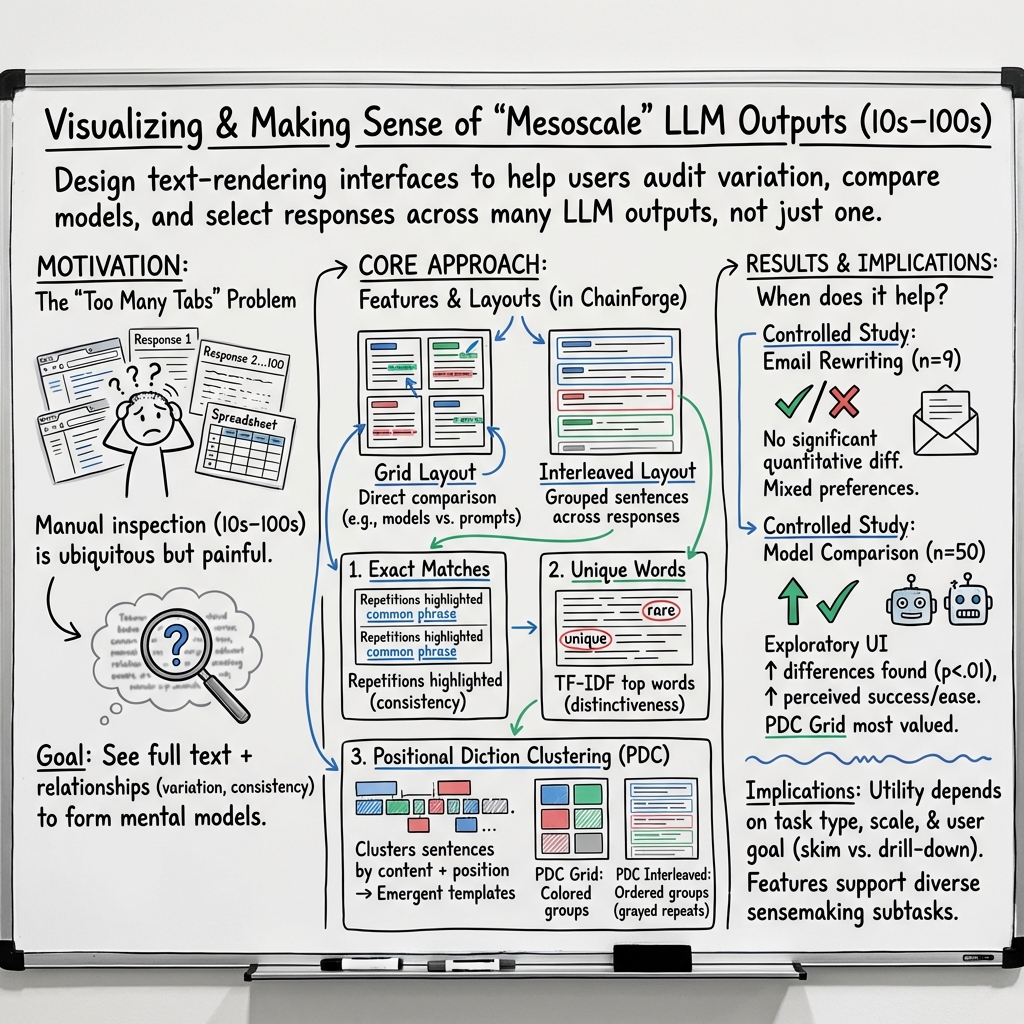
- They created an interface that shows many AI responses together and adds smart highlights. The goal is to make patterns pop out without hiding the actual words.
- They combined text analysis (finding what’s similar or unique across responses) with visual rendering (how it’s displayed on the screen).
The features included:
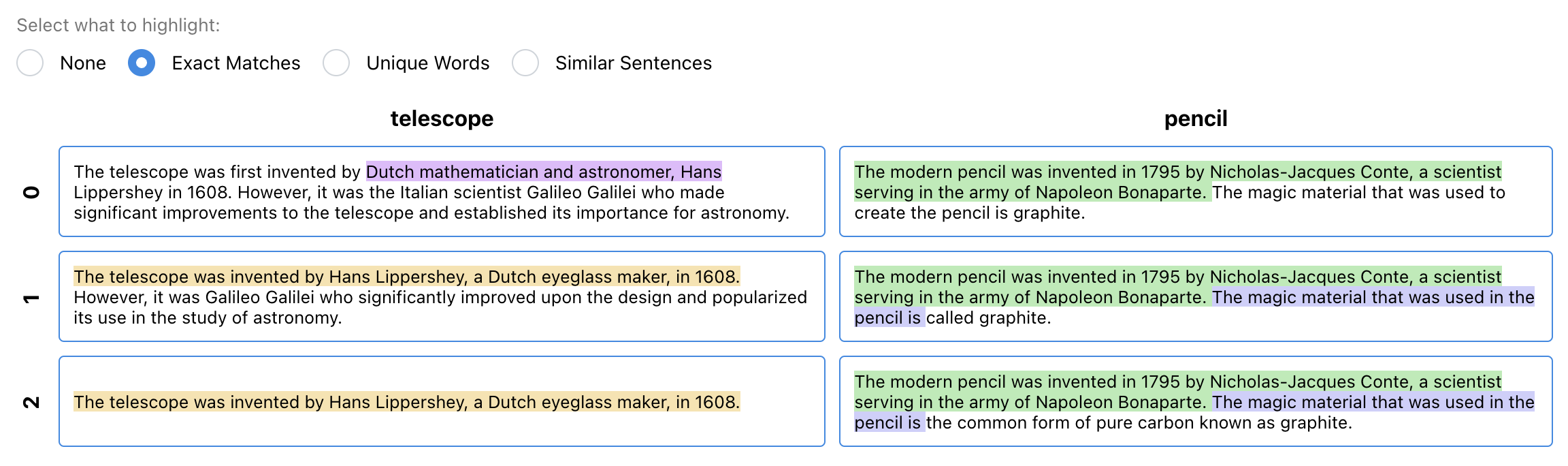
- Exact Matches: Highlights identical phrases that appear in multiple responses. Think of it like color-coding repeated lines in several essays so you can quickly see common parts.
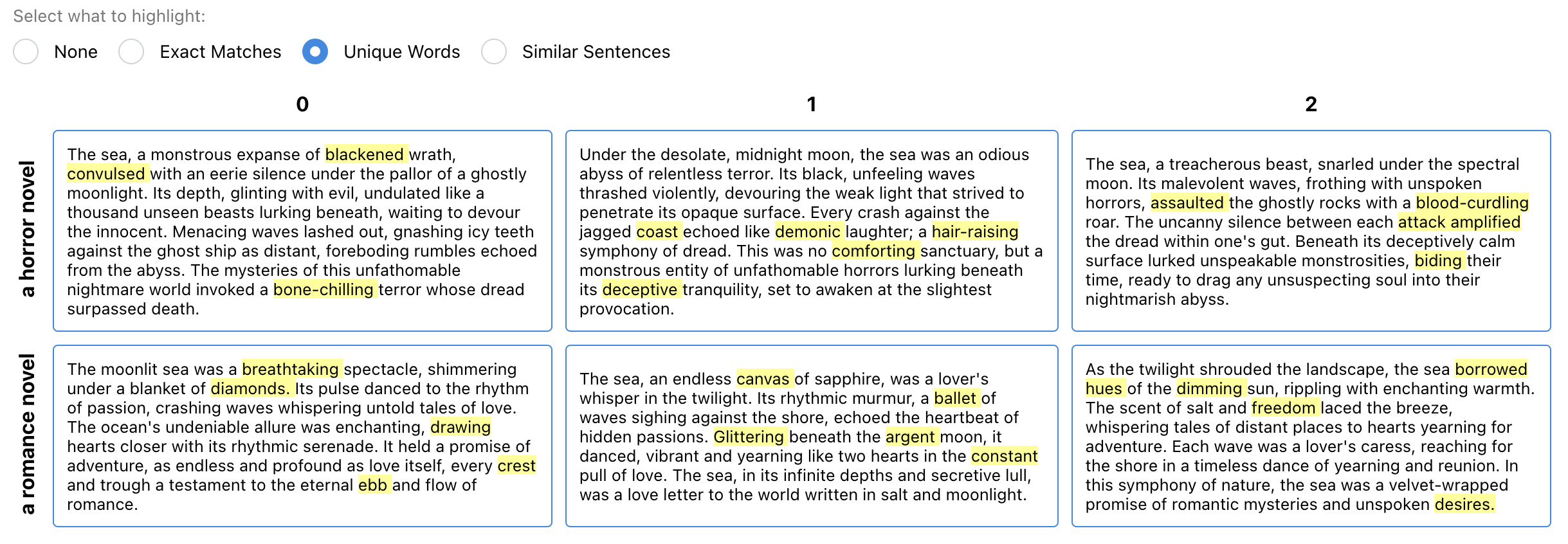
- Unique Words: Highlights words that are more “special” or distinctive in one response compared to others. This uses a simple scoring idea (TF‑IDF), which is like noticing that “spaceship” shows up in one story but barely anywhere else, so it’s unique.
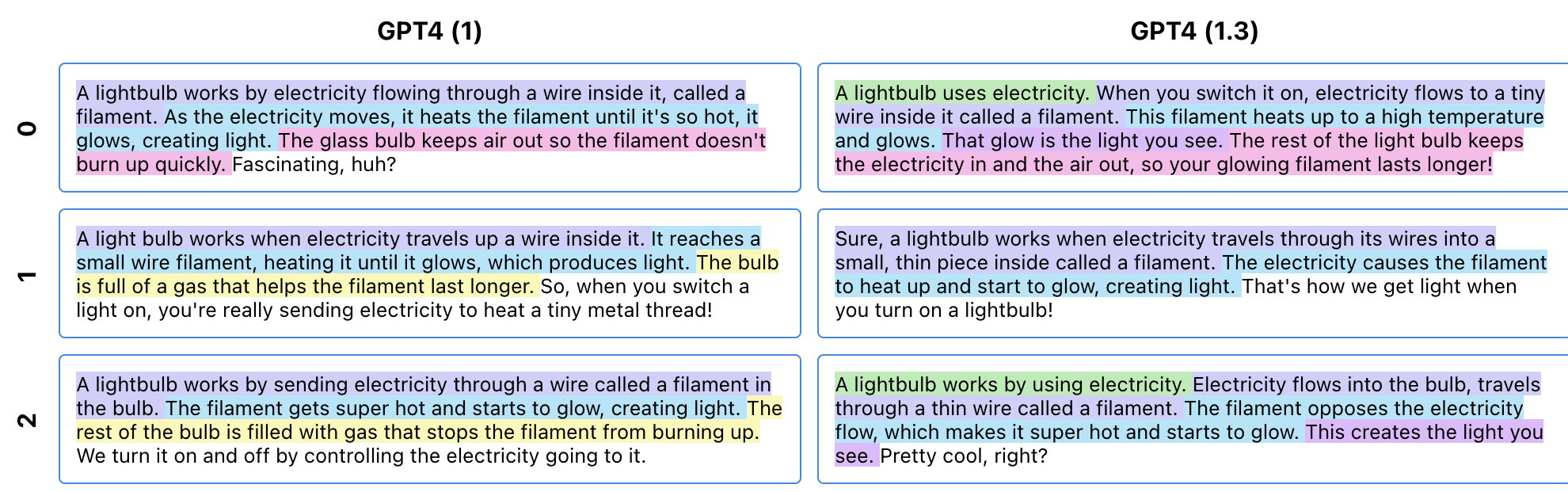
- Positional Diction Clustering (PDC): A new algorithm that groups sentences across different responses when they say similar things in similar places (like “opening line,” “middle detail,” “ending”). Imagine lining up many stories and finding the parts that act like the same “role” (greetings at the start, lessons at the end), even if the exact words differ.
- Grid Layout: Responses are placed in a grid (rows and columns), which can be organized by things like model type or prompt variations. The grid acts like a map that’s easy to skim.
- Interleaved View: Shows similar sentences from different responses stacked together, with repeated words faded, so differences stand out.
How they tested it:
- Controlled user study (24 participants): They compared their features to a simpler, baseline interface that just lists responses. Tasks included email rewriting and comparing two LLMs, using 9 to 50 outputs.
- Case studies (8 real-world scenarios): Participants used the system for their own work, like poetry and fiction, checking for social bias, and reviewing legal advice generated by AI.
- Formative interviews (8 professionals): They interviewed doctors, startup founders, researchers, and artists who work with LLMs. Many said automatic scores don’t capture what matters, so they rely on manual inspection of 10s–100s of outputs.
Main Findings
The features helped people:
- Spot similarities and differences in style, content, and structure much faster.
- Notice diversity across responses and find “outliers” (unusual or potentially problematic outputs).
- Form and test ideas about how a model behaves (“This model always adds a friendly opening,” “This one varies the endings”).
- Handle more responses at once than they thought they could, reducing mental effort while keeping the full text visible.
Participants had different preferences (some liked an overview, others liked to page through chunks), but many gained confidence in inspecting larger sets when using the highlights and layouts.
Why It Matters
Being able to see many AI outputs at once—and understand them—matters because it helps with:
- Choosing the best output for a task (like picking the most clear and polite email).
- Improving prompts and comparing models (which one suits your needs better?).
- Auditing AI for issues (like unfair bias or unsafe advice).
- Brainstorming and creative work (quickly scanning many ideas and finding gems).
Instead of relying only on automatic scores or summaries (which can be misleading or miss nuance), this approach lets people work directly with the text while still saving time.
Implications and Potential Impact
This work offers practical design guidelines for future AI interfaces:
- Show the full text but add helpful, trustworthy highlights that reveal patterns.
- Use layouts (like grids and interleaved views) that support quick comparison.
- Provide tools that scale from 10s to 100s of responses, making complex tasks doable.
If widely adopted, these ideas could make AI use safer, more transparent, and more effective. They can help everyday users, developers, and researchers better understand how models behave, select the right outputs, and build more reliable AI-powered tools. The new PDC algorithm is a promising step toward revealing structure in AI-generated text without hiding the details.
Knowledge Gaps
Knowledge gaps, limitations, and open questions
Below is a focused list of what remains missing, uncertain, or unexplored, framed to guide future research and design iterations.
- Scalability limits are unclear: the features are designed for “mesoscale” (10s–100s of outputs), but the paper does not evaluate performance, usability, or rendering fidelity on thousands of outputs or very long responses; memory/performance characteristics and virtualization strategies are not reported.
- Generalization across languages and modalities is untested: all examples appear to be in English text; it remains unknown how well the features (especially PDC and TF‑IDF highlighting) transfer to multilingual corpora, non-Latin scripts, code, tables, structured outputs, or multi-modal content.
- Applicability to multi-turn dialogues is not established: the features focus on single-turn, multi-response corpora; how to extend alignment, grouping, and rendering to conversational threads remains open.
- Objective effectiveness metrics are missing: beyond “decreased perceived working memory load,” there is no report of improvements in time-to-completion, task accuracy, decision quality, error detection rates, or user confidence, nor standardized measures (e.g., NASA‑TLX, SUS) to quantify cognitive load and usability.
- No head-to-head comparison with existing systems: the baseline is a linear list, but the paper does not experimentally compare against other sensemaking tools (e.g., Graphologue, Sensescape, Promptfoo) or corpus visualization systems, leaving relative benefit uncertain.
- PDC algorithm details and validity are incomplete: the paper does not fully specify sentence segmentation standards, semantic similarity models, positional alignment strategy, clustering method, parameter choices, or robustness to reordering, insertions/deletions, and variable-length outputs; there is no quantitative evaluation of cluster quality or alignment correctness.
- Sensitivity and failure modes of PDC are not analyzed: how often PDC produces misleading groupings, merges semantically distinct sentences, or misses meaningful analogies is unknown; diagnostics, guarantees, and user-facing indicators of uncertainty are not provided.
- Highlighting biases and cognitive effects are unexamined: the paper does not study anchoring, attentional capture, or framing effects introduced by exact matches and “unique words” highlights, nor how these impact judgment quality, exploration breadth, or bias detection.
- Accessibility considerations are absent: color usage, contrast, font sizes, keyboard navigation, screen reader support, and colorblind-safe palettes are not evaluated; how highlights render for low-vision users is not addressed.
- Limited user control over algorithms and thresholds: it is unclear whether users can tune TF‑IDF parameters (stopword lists, number of words), match-length cutoffs, PDC cluster granularity, or confidence thresholds; the trade-off between “no lens selection” and optional user-configurable lenses is unexplored.
- Interaction design for filtering and faceting is minimal: the paper does not describe support for faceted search, dynamic filtering (e.g., by model, prompt variant, topic), or progressive disclosure to manage large corpora while preserving full-text accessibility.
- Longitudinal and in-the-wild validation is missing: case studies are brief and lab-like; sustained adoption, learning effects, organizational workflows, and impacts on team collaboration and auditing are not measured over time.
- High-stakes domain reliability is untested: while formative interviews cover clinical and legal contexts, the interface’s effect on error detection, risk mitigation, and trust calibration in high-stakes scenarios is not systematically evaluated.
- Bias and outlier detection efficacy is not quantified: the paper reports qualitative utility, but does not measure recall/precision for identifying biased or problematic outputs, nor false-positive/false-negative rates induced by the features.
- Impact of sampling settings is unknown: the effect of temperature, top‑p, and other generation parameters on the utility of features and the shape of output distributions is not studied.
- Support for streaming or iterative corpus growth is undeveloped: how the interface handles incoming outputs (e.g., real-time generation, batching), incremental recomputation of highlights/PDC, and preserving user context remains open.
- Privacy and security considerations are unstated: the implications of rendering sensitive corpora (e.g., medical or legal text), data retention, anonymization, and on-device versus cloud processing of highlights are not discussed.
- Reproducibility and release artifacts are incomplete: prompts, datasets, model versions, parameter settings, and code required to replicate the user study and case studies are not fully specified; availability and documentation of the PDC implementation are unclear.
- Negative impacts and counterfactual baselines are not analyzed: the paper does not report cases where features hindered performance, led to misinterpretation, or increased time-on-task, nor analyze when a simpler baseline might outperform the proposed interface.
- Extension to multimodal generative AI is open: the paper motivates grids from image generation but does not propose or evaluate mixed-modality renderings (text + images/audio) or cross-modal alignment strategies.
- Formalization of “mesoscale” is lacking: criteria defining mesoscale (e.g., number/length of outputs, reading time, screen real estate) and guidelines for when to switch between overview and detail are not operationalized.
- Discourse- and structure-aware alignment is not explored: PDC relies on positional similarity; integration of rhetorical structure (e.g., RST), discourse markers, or argumentation schemes to align comparable content across outputs is uninvestigated.
- Outlier detection algorithms are not integrated: beyond visual scanning, there is no method to algorithmically surface atypical outputs or segments with user-adjustable sensitivity and explanations.
- Ethics and misuse risks are unaddressed: the interface could facilitate cherry-picking outputs for persuasive or deceptive purposes; safeguards, audit trails, and transparency about selection processes are not discussed.
- Readability trade-offs in the interleaved view are unstudied: whether interleaving improves comprehension or introduces confusion (e.g., disrupted narrative flow) is not measured, nor guidance on when to prefer grid vs interleaved layouts.
- Pipeline integration for model evaluation and training is unclear: how sensemaking outputs inform model selection, prompt iteration, or fine-tuning (e.g., generating labeled datasets from highlights/PDC clusters) is not specified.
- Theoretical claims are not empirically validated: while Variation Theory and Analogical Learning Theory motivate design, the paper does not experimentally demonstrate that these features improve mental model formation or transfer across tasks in measurable ways.
Practical Applications
Below is a concise synthesis of actionable, real-world applications enabled by the paper’s methods and findings (grid-based, text-first rendering; Exact Matches; Unique Words via TF‑IDF; and the novel Positional Diction Clustering with interleaved rendering). Each item notes sectors, likely tools/workflows, and feasibility constraints.
Immediate Applications
- Bold prompt engineering workbench for model/prompt selection
- Sectors: software, product/UX, LLM platform tooling
- What: Compare 10–100 outputs across models/prompts in a grid; use Exact Matches to spot boilerplate, Unique Words to surface differentiation, PDC to align structure and detect outliers; select best prompts/models quickly.
- Tools/workflows: Integrate as a view in Promptfoo, Weights & Biases, LangSmith, ChainForge; add “multi-draft grid” and “PDC interleaved” toggles; export winners with rationales.
- Assumptions/dependencies: Access to multiple generations per prompt; token budget and latency tolerance; UI performance for long texts; English-first tuning unless multilingual support is added.
- Rapid copy/UX content review and selection
- Sectors: marketing, product design, support operations
- What: Bulk-generate taglines/emails/help text; grid to assess tone and compliance; PDC to detect shared structure and deviations; pick top variants.
- Tools/workflows: Batch generate N=30–50 per prompt; reviewers filter via highlights; one-click selection and A/B test handoff.
- Assumptions: Content length modest (1–8 sentences) for best PDC alignment; reviewers trained to interpret highlights.
- Bias and safety red-teaming at the mesoscale
- Sectors: trust & safety, compliance, research
- What: Generate many outputs across sensitive attributes; use Unique Words to flag identity-linked terms; PDC to compare structure across cohorts; Exact Matches to spot repeated problematic phrasing.
- Tools/workflows: Red-team suite with grid and interleaved views; export outliers to issue trackers; attach highlighted evidence to reports.
- Assumptions: Carefully designed prompt matrices; secure environments for sensitive data; human oversight for nuanced judgments.
- Email rewriting and tone control for professionals
- Sectors: daily life, enterprise productivity, education
- What: Produce multiple rewrites; scan grid; use Unique Words to find tone/lexical shifts; PDC to align openings/closings; pick and lightly edit.
- Tools/workflows: “Rewrite with multi-drafts” button in email/Docs editors; side-panel with PDC interleaved comparisons.
- Assumptions: Short-form text; users comfortable scanning 9–24 variants.
- Legal and healthcare communication review
- Sectors: legal services, healthcare
- What: Inspect patient explanations or client memos; Exact Matches to verify boilerplate; Unique Words to spot risky or domain-incorrect terms; PDC to detect structural omissions (e.g., missing disclaimers).
- Tools/workflows: Draft-generation panels with compliance highlighters; export flagged passages to approval workflows.
- Assumptions: Human subject-matter experts review before use; PHI/PII handling and on-prem or VPC deployments.
- Model comparison and benchmarking without brittle metrics
- Sectors: academia, applied ML, procurement
- What: Compare models across prompts with grid + PDC to characterize behavioral differences beyond automatic scores.
- Tools/workflows: Side-by-side model x prompt grid; annotation capture for qualitative benchmarks.
- Assumptions: Curated task sets; standardized sampling; careful measurement of reviewer time/cognitive load.
- QA and regression detection for LLM releases
- Sectors: MLOps, platform teams
- What: Compare outputs pre/post model updates; Exact Matches to detect stability, Unique Words/PDC to spot shifts and novel failure modes; triage regressions fast.
- Tools/workflows: “Release diff” dashboard; snapshot and compare batches; alert on structural divergence.
- Assumptions: Versioned prompts and datasets; repeatable sampling seeds/settings.
- Curriculum feedback and assessment authoring
- Sectors: education
- What: Generate rubric/feedback drafts; grid scan for clarity/consistency; PDC to align sections (criteria, suggestions); approve best.
- Tools/workflows: LMS plugin with multi-draft inspection; export to gradebooks.
- Assumptions: Teachers maintain editorial control; low-stakes contexts initially.
- Creative ideation (poetry/fiction/UX copy)
- Sectors: creative industries, product
- What: Explore stylistic and structural diversity at a glance; Unique Words to surface novel angles; PDC to juxtapose analogous story beats/structures.
- Tools/workflows: Ideation canvas with grid+interleaved switching; save “beats” from multiple drafts to compose a final.
- Assumptions: Audience tolerance for exploratory reading; manageable text lengths.
- Dataset curation and labeling accelerants
- Sectors: research, data operations
- What: Use PDC groups as units for annotation (e.g., label cluster for correctness/safety), identify informative outliers.
- Tools/workflows: Batch-label by cluster; export labels to fine-tuning/RLHF pipelines.
- Assumptions: Annotators calibrated on what highlights mean; cluster boundaries imperfect and require review.
- Localization and translation quality checks
- Sectors: localization, global support
- What: For multiple translations, PDC aligns sentence-level structure; Unique Words finds domain terms; ensure consistent structure and terminology.
- Tools/workflows: Side-by-side source and many candidate translations; approve/edit best.
- Assumptions: Extend PDC/TF‑IDF to multilingual/tokenization specifics.
- Documentation and style unification
- Sectors: software, enterprise content
- What: Generate many doc sections; Exact Matches validate templates; Unique Words flag inconsistent nomenclature; PDC ensures consistent structure across modules.
- Tools/workflows: Docs CI step with “mesoscale review” for new LLM-generated sections.
- Assumptions: Stable templates; maintainers available for reviews.
Long-Term Applications
- Standardized pre-deployment audit frameworks
- Sectors: policy/regulation, compliance
- What: Formalize mesoscale inspection protocols (prompt matrices, PDC-based reporting) as part of model validation and documentation.
- Tools/products: Audit dashboards with evidence capture and sign-off trails.
- Dependencies: Regulator buy-in; guidance for audit sampling and interpretation.
- Continuous safety and drift monitoring at scale
- Sectors: MLOps, trust & safety
- What: Automated batch generation + PDC to detect distributional/structural shifts over time; alerting for emerging risks.
- Tools/products: Always-on monitoring with “structural delta” metrics.
- Dependencies: Compute budget for routine sampling; robust baselines; noise handling.
- Semi-automated meta-evaluation and selection
- Sectors: applied ML, platforms
- What: Train secondary models to predict quality by leveraging PDC groupings and human labels; guide best-of-N selection or reranking.
- Tools/products: “Sensemaking-informed” selectors tied to UI.
- Dependencies: Labeled datasets derived from mesoscale reviews; risk of overfitting to superficial features.
- Human-in-the-loop fine-tuning/RLHF at the cluster level
- Sectors: research, foundation model dev
- What: Collect feedback per PDC cluster (structural element) to inform reward models/policies more efficiently than per-sample review.
- Tools/products: Cluster-centric feedback UIs; pipeline integration.
- Dependencies: Alignment between cluster semantics and task goals; update cadence.
- Domain-specific PDC variants
- Sectors: healthcare, legal, finance, scientific writing
- What: Enhance PDC with domain ontologies and section-aware parsing (e.g., disclaimers, risk factors, citations).
- Tools/products: “PDC‑Clinical,” “PDC‑Legal” packages; compliance-aware renderers.
- Dependencies: High-quality domain parsers; expert validation; governance.
- Cross-lingual and multimodal extensions
- Sectors: localization, media, robotics
- What: Extend alignment to multilingual text and to multimodal sequences (e.g., image captions, code+text, action plans).
- Tools/products: Generalized “positional alignment” services for sequences.
- Dependencies: Embeddings/tokenization parity across languages/modalities; evaluation at scale.
- Education and LLM literacy programs
- Sectors: academia, K‑12, workforce training
- What: Teach model variability, bias detection, and critical reading using mesoscale interfaces; improve AI literacy.
- Tools/products: Curricula, teaching modules, sandbox environments.
- Dependencies: Instructor training; accessible datasets; classroom-ready tooling.
- Governance and provenance of human decisions
- Sectors: enterprise, policy
- What: Record reviewer rationales linked to highlighted evidence; enable traceability for audits and incident response.
- Tools/products: Decision logs with cryptographic provenance; policy portals.
- Dependencies: Workflow adoption; privacy controls; retention policies.
- Multi-agent and ensemble coordination
- Sectors: software agents, orchestration
- What: Use PDC to align outputs from multiple agents or strategies; detect divergence and reconcile plan steps.
- Tools/products: Agent orchestration consoles with structural comparison.
- Dependencies: Standardized agent schemas; latency/cost of parallel generation.
- Research-grade qualitative benchmarks
- Sectors: academia, evaluation consortia
- What: Build community datasets/benchmarks for mesoscale qualitative comparisons (style diversity, structural faithfulness).
- Tools/products: Open leaderboards augmented with human sensemaking artifacts.
- Dependencies: Annotation protocols; inter-rater reliability; hosting/sponsorship.
- Assistive interfaces for cognitive load reduction
- Sectors: accessibility, HR/operations
- What: Tailor highlight density/contrast and pagination strategies for neurodiverse users; empirically validate load reduction.
- Tools/products: Accessibility modes for mesoscale inspectors.
- Dependencies: UX research; standards alignment (WCAG).
- Safer guardrail authoring
- Sectors: trust & safety, compliance
- What: Derive rule/pattern libraries from outlier clusters for content filters and structured remediation prompts.
- Tools/products: Pattern libraries linked to blocked/rewritten outputs.
- Dependencies: False-positive/negative management; continuous updating.
Notes on feasibility applicable across applications:
- The approach assumes access to multiple generations per prompt and manageable response lengths; very long or highly unstructured outputs may reduce PDC effectiveness.
- Highlighting fidelity depends on tokenization, language, and domain; multilingual and jargon-heavy domains need adaptation.
- Human interpretation remains central; interfaces should support exporting evidence and capturing rationales for accountability.
- Privacy/security requirements may necessitate on-prem or isolated deployments for sensitive content (healthcare, legal, finance).
Glossary
- Abstractive summaries: Automatically generated summaries that paraphrase and condense content rather than extracting sentences verbatim. "Some tools integrate automatically generated abstractive summaries into reading support"
- Analogical Learning Theory: A cognitive theory proposing that people learn by mapping relational structures across examples, aiding transfer and schema formation. "In line with Analogical Learning Theory~\cite{gentner1983structure}, PDC highlights positionally consistent analogical text across LLM responses such that users can see emergent relationships."
- Bricolage: Constructing or composing something by assembling diverse elements at hand; in this context, piecing together parts of multiple LLM outputs. "compose their own response through bricolage,"
- CollateX: A software tool for digital collation that supports comparing multiple textual witnesses using graph-based alignment. "CollateX~\cite{haentjens2015computer} later introduced variant graphs to enable the comparison and alignment of more than two documents and integrated the process into the digital collation workflow."
- Concordance tables: Tabular displays that show occurrences and contexts of words or phrases across texts to support comparative analysis. "uses concordance tables to display LLM responses to support users in investigating problematic responses and distribution shifts across responses"
- Distribution shifts: Changes in the underlying data distribution that can alter a model’s behavior across contexts or over time. "problematic responses and distribution shifts across responses"
- Edit distances: String similarity metrics that count the minimal number of edits required to transform one sequence into another. "focused on algorithms involving edit distances and document-to-document matrices"
- Exact matches: Identical text segments that recur across multiple documents or outputs, useful for spotting repetition. "The existing features we instantiate are two forms of text highlighting, showing either exact text matches or unique words."
- Interleaved View: An interface layout that places analogous sentences from different outputs in alternating lines to facilitate direct comparison. "Top right is the Interleaved View of Position Diction Clustering, where sentences are on individual lines and if a word in a sentence occurs in the same location in the previous sentence, that word is greyed out."
- Longest common substrings: The maximal-length substrings shared among strings, used here to detect repeated text across responses. "We detect and highlight the longest common substrings, as that appeared to be most robust to a wide variety of response types during informal evaluations."
- Mesoscale: A middle scale of analysis between individual examples and very large corpora; here, tens to hundreds of LLM outputs. "We therefore call this mesoscale\ (âmiddle scaleâ) of LLM response sensemaking."
- Natural language generation: A subfield of AI focused on automatically producing coherent text in human languages. "Computing methodologies~Natural language generation"
- Positional Diction Clustering (PDC): A novel algorithm that groups sentences across outputs based on both semantic similarity and their position within responses. "a novel algorithm we call Positional Diction Clustering"
- Sensemaking: The process of organizing and interpreting information to build understanding and support decision-making. "RQ: How can text-rendering interface design better support sensemaking of LLM outputs at the mesoscale?"
- Sequence alignment: A computational method for arranging sequences to identify regions of similarity and correspondence. "text alignment has treated it as a sequence alignment problem"
- Stop words: Very common words (e.g., “the”, “and”) typically excluded in NLP to focus on more informative terms. "We remove stop words"
- Term frequency-inverse document frequency (TF-IDF): A weighting scheme that scores how characteristic a word is of a document relative to a corpus. "we use a simple measure that has been widely studied in Natural Language Processing and Information Retrieval: term frequency-inverse document frequency (TF-IDF)"
- Text saliency modulation: A visualization technique that adjusts the visual prominence of text to highlight important or differing parts. "reifies these differences using text saliency modulation"
- Variant graphs: Graph structures that represent aligned alternative readings or versions across multiple documents. "introduced variant graphs to enable the comparison and alignment of more than two documents"
Collections
Sign up for free to add this paper to one or more collections.