Steering LLM Summarization with Visual Workspaces for Sensemaking
Abstract: LLMs have been widely applied in summarization due to their speedy and high-quality text generation. Summarization for sensemaking involves information compression and insight extraction. Human guidance in sensemaking tasks can prioritize and cluster relevant information for LLMs. However, users must translate their cognitive thinking into natural language to communicate with LLMs. Can we use more readable and operable visual representations to guide the summarization process for sensemaking? Therefore, we propose introducing an intermediate step--a schematic visual workspace for human sensemaking--before the LLM generation to steer and refine the summarization process. We conduct a series of proof-of-concept experiments to investigate the potential for enhancing the summarization by GPT-4 through visual workspaces. Leveraging a textual sensemaking dataset with a ground truth summary, we evaluate the impact of a human-generated visual workspace on LLM-generated summarization of the dataset and assess the effectiveness of space-steered summarization. We categorize several types of extractable information from typical human workspaces that can be injected into engineered prompts to steer the LLM summarization. The results demonstrate how such workspaces can help align an LLM with the ground truth, leading to more accurate summarization results than without the workspaces.
Paper Prompts
Sign up for free to create and run prompts on this paper using GPT-5.
Top Community Prompts
Explain it Like I'm 14
Overview
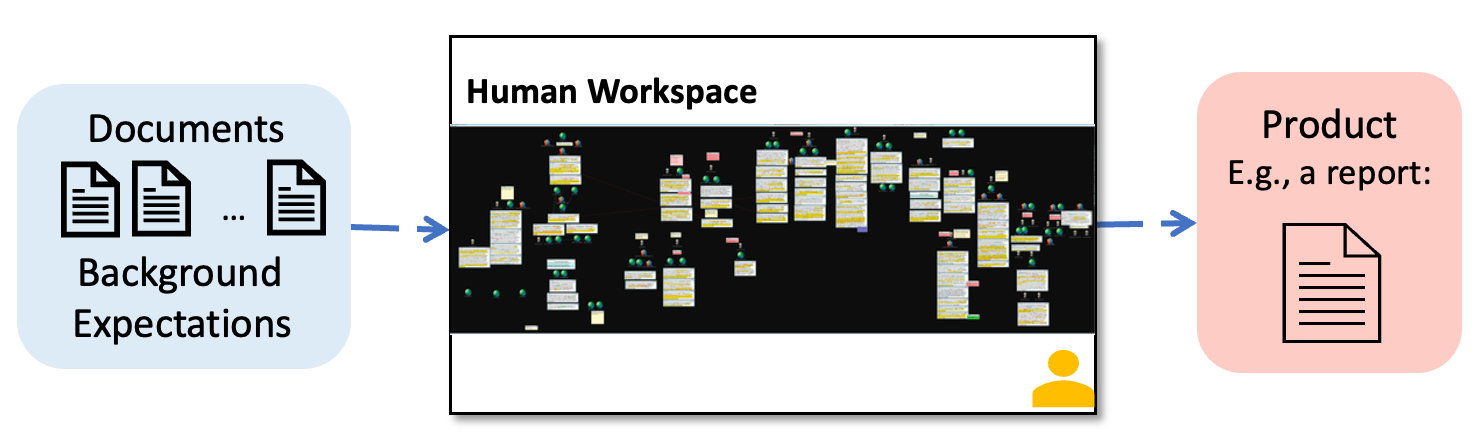
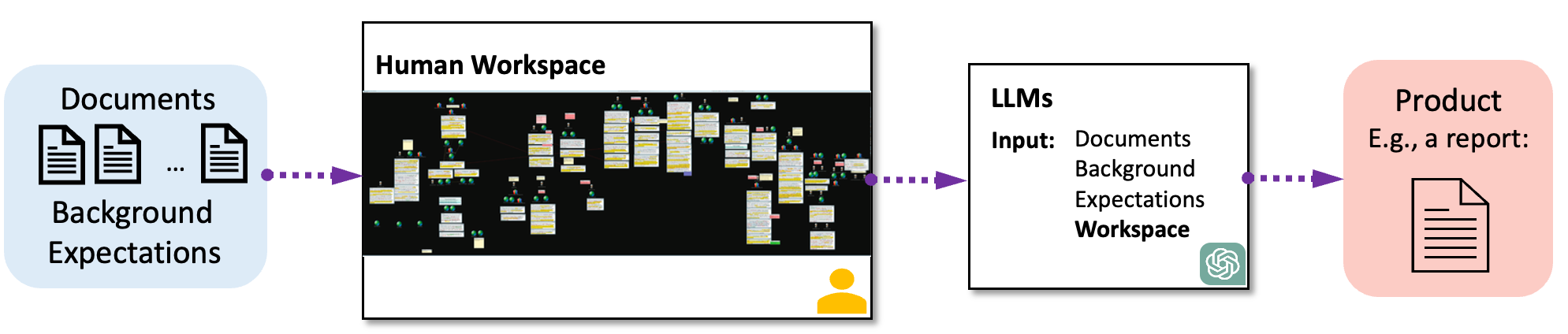
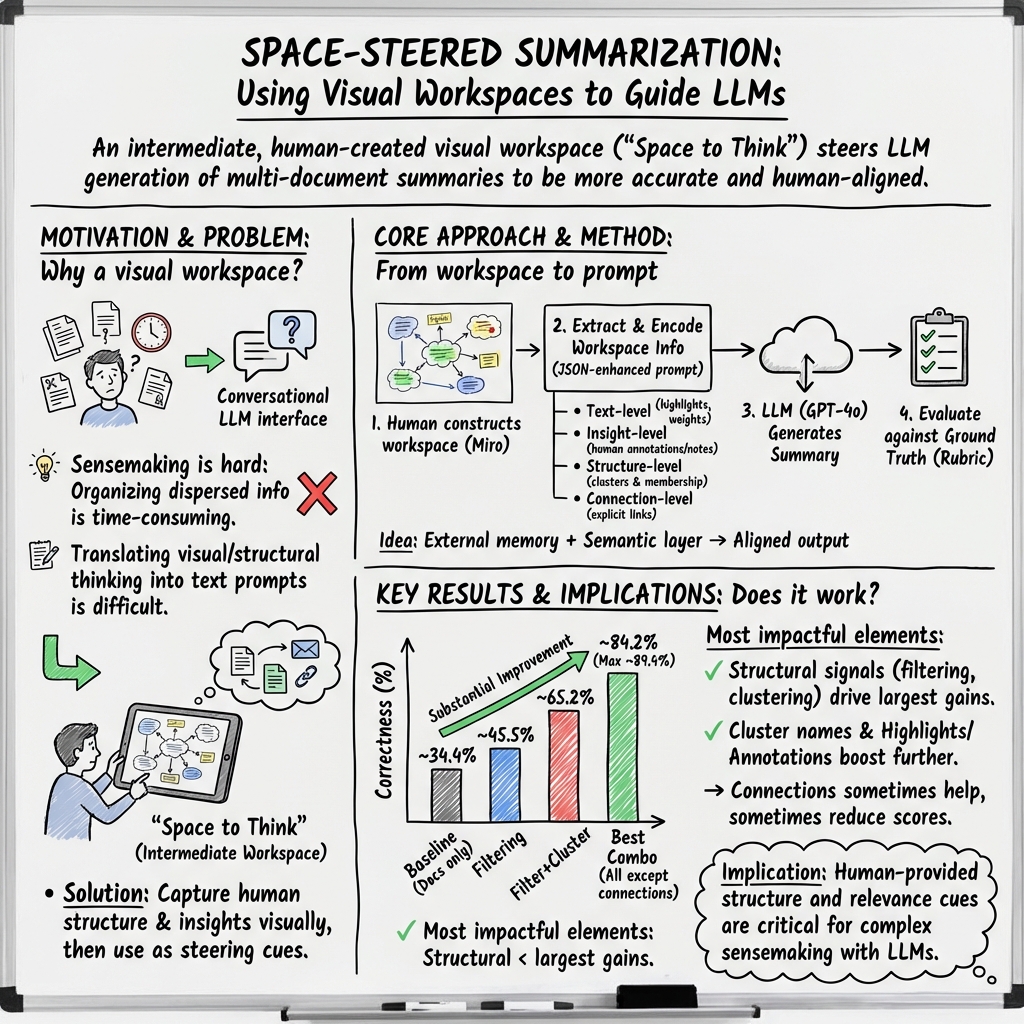
This paper looks at how to help an AI write better summaries when there are lots of documents to read. The authors suggest using a “visual workspace” — think of a big digital whiteboard with sticky notes, highlights, circles, arrows, and clusters — as a middle step before the AI starts summarizing. By turning this visual organization into instructions the AI can understand, the summaries become more accurate and closer to what a human expert would write.
Key Questions
The paper asks two main questions in simple terms:
- If we show the AI a neatly organized “map” of the information (the visual workspace), will it write better summaries than without that map?
- Which parts of that map (like highlights, clusters, notes, or connections) help the AI the most?
How They Did It
What’s a visual workspace?
Imagine you’re trying to make sense of a big mystery with many clues. You spread everything out on a huge board, highlight important names, draw arrows to connect related events, group similar documents together, and add notes. That board acts as:
- External memory: like writing things down so you can remember them later.
- A semantic layer: a simple structure (groups, labels, timelines) that gives meaning to the mess of information.
Turning pictures into instructions the AI can read
The team took the visual workspace and converted it into a structured text format (JSON — basically a clean way of listing items and their details) so the AI could “see”:
- Text-level info: which words or phrases were highlighted as important.
- Insight-level info: short human notes explaining key ideas about specific documents or groups.
- Structure-level info: how documents were grouped into clusters, with cluster names and document content.
- Connections: arrows/lines showing relationships (like a timeline linking events or documents).
They combined this workspace information with the original documents and asked GPT‑4o (a powerful LLM) to write summaries.
The test data and setup
They used a fictional intelligence-analysis dataset called “Sign of the Crescent” with 40 documents (23 were relevant). The correct answers (“ground truth”) were already known, covering “Who, When, Where, and What.”
They built a visual workspace in Miro (a digital whiteboard) that matched the ground truth: highlighted key names, wrote annotations, grouped documents into clusters with labels, and linked events in a timeline.
Then they tried different prompt versions:
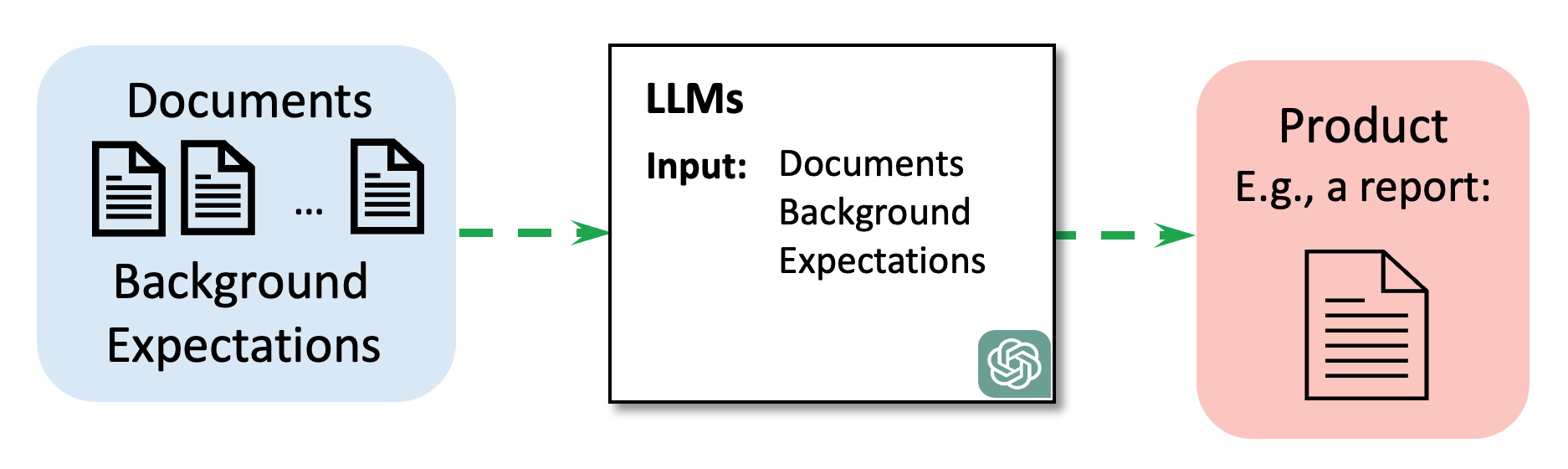
- Baseline: only give the AI all documents.
- Add filtering: only the relevant documents (based on the workspace).
- Add clustering: tell the AI how those documents are grouped.
- Add highlights, annotations, and connections: provide more details from the workspace.
- Add cluster names: tell the AI what each group means.
They ran each version multiple times and measured the results.
How they scored the summaries
To score correctness, they used a 33-point rubric focused on getting the “Who, When, Where, What” right across plotlines. They used GPT‑4o to answer questions about the summary and grade itself against the rubric (with a fixed setting to be consistent). Scores were shown as percentages of 33.
What They Found
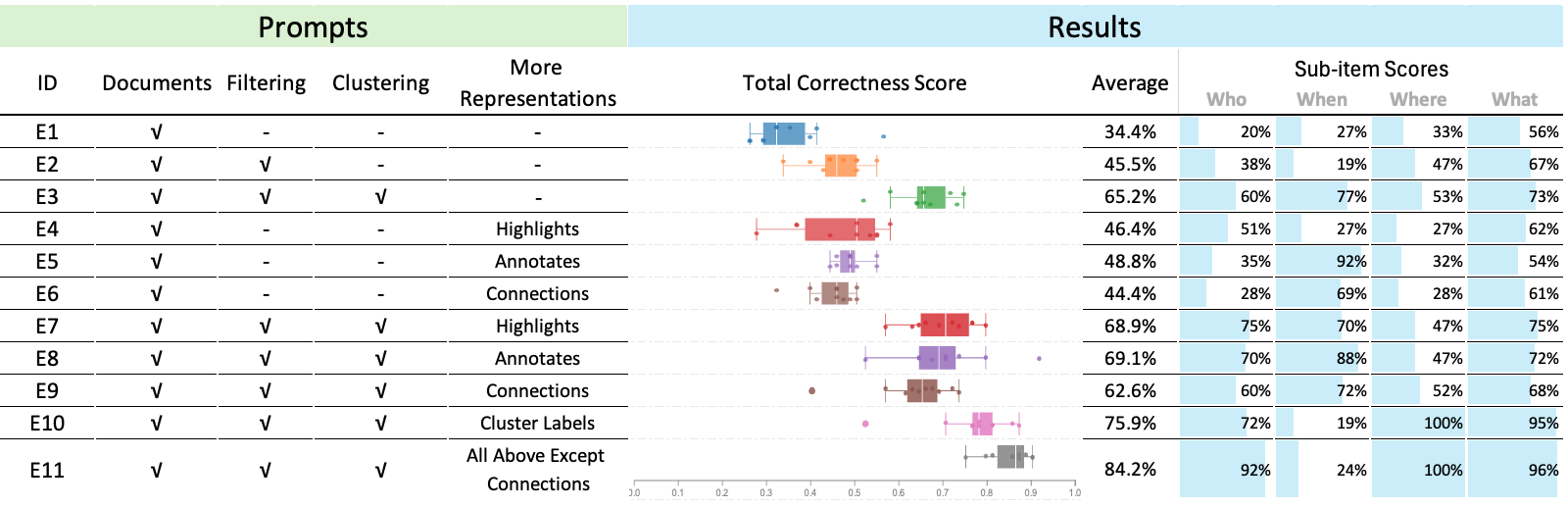
- Without workspace help (baseline), summaries averaged 34.4% correctness.
- Adding filtering (only relevant docs) boosted scores to 45.5%.
- Adding clustering on top of filtering raised scores further to 65.2%.
- Adding cluster names (clear labels for each group) reached 75.9%.
- Combining everything except connections (filtering + clustering + cluster names + highlights + annotations) produced the best results: an average of 84.2%, with the top run at 89.4% (29.5/33). This even beat the best human score reported in a related study (29/33).
- Highlights and annotations helped, especially to improve “Who” and “What.”
- Connections (like a timeline) were helpful mainly when filtering and clustering weren’t used; otherwise, they sometimes made results worse (probably by adding complexity without enough structure).
They also did a mini case study on a literature review:
- With the workspace, the AI consistently grouped papers into the intended categories (“user actions” vs “insight”) and used the exact phrasing from highlights.
- Without the workspace, the AI grouped papers inconsistently across runs and sometimes used vague wording.
Why It Matters
- Better guidance, better summaries: When the AI is given a clear map (the visual workspace) — especially filtering and clustering with good cluster names — it writes summaries that match the known correct answers much more closely.
- Faster work: One AI summary took around 10 seconds, while a human writing a similar summary took about an hour in a related study. This suggests strong potential for saving time.
- Human-AI teamwork: The visual workspace acts like a shared tool where humans organize their thoughts, and the AI uses that structure to reason more effectively. It can become a medium for collaboration — helping humans steer, verify, and refine AI outputs.
- Future directions: The authors suggest building interactive systems where AI helps create the workspace (mixed-initiative), checks its own summaries against source materials (verification), and lets users iteratively improve results. This could make tackling complex, multi-document problems easier for analysts, researchers, and students.
In short, giving AI a well-organized “whiteboard” of the information before asking for a summary can dramatically improve accuracy and make the work faster and more aligned with human understanding.
Knowledge Gaps
Knowledge gaps, limitations, and open questions
Below is a consolidated list of what the paper leaves unresolved, focusing on concrete gaps and actionable open questions for future research.
Experimental design and datasets
- The intermediate workspace was constructed from ground truth (idealized) rather than created by analysts during real tasks; assess performance with realistic, noisy workspaces produced by users under time/knowledge constraints.
- Only one small, fictional dataset (40 documents) was used; test across multiple domains (e.g., finance, medicine, journalism), larger corpora (103–105 docs), and diverse task types (event synthesis, argument mining, investigative reporting).
- The literature review “case study” is anecdotal and based on a single paragraph; conduct systematic, quantitative evaluations across many papers and topics with expert benchmarks.
- No analysis of whether results depend on the particular narrative structure of the chosen dataset; evaluate across datasets with different plot complexity, number of entities, and temporal/causal density.
Evaluation methodology and validity
- GPT-4o both generated and graded outputs, risking model self-preference bias; validate with independent human experts and/or a different evaluator model, and measure inter-rater reliability.
- Only “Correctness” (Who/When/Where/What) was scored; add faithfulness/hallucination, coverage/recall, coherence, organization, and citation/provenance metrics.
- No statistical significance tests or effect-size reporting for condition differences; include hypothesis testing and power analysis.
- Human baseline is taken from a prior study without the “ideal” workspace; run a matched contemporary human baseline (with and without workspace) for fair comparison.
- End-to-end time savings were claimed (10s vs ~1hr) without counting workspace creation time; measure total task time (workspace construction + LLM runs + verification) and report learning curve effects.
- Sensitivity to prompt design is only partially explored (temperature sweeps); systematically ablate prompt components (system prompt, few-shot examples, top_p, penalties, JSON schema variants) and measure robustness.
Method and representation design
- The four extracted information types (text-level, insight-level, structure-level, connections) omit spatial/geometric features (position, proximity, grouping, layout symmetry) that may carry analyst intent; test encodings that explicitly model spatial cues.
- Connections reduced performance in combined settings; investigate why (e.g., noise, redundancy, conflicting signals), and test typed edges (temporal, causal, evidential), edge weights, and canonical serialization (timelines, causal graphs).
- Cluster names significantly improved accuracy; quantify sensitivity to ambiguous/misleading names, synonyms, multi-lingual labels, and length/detail trade-offs.
- Weighting schemes for text-level highlights and graph degrees are informal; devise principled weighting/normalization and compare alternatives (TF-IDF, salience learned from interaction logs).
- The pipeline encodes clusters by including document content (token-heavy); explore lightweight representations (vector IDs, document summaries, citations) and their effect on accuracy-cost trade-offs.
- The JSON schema is ad hoc; evaluate formal schemas (RDF/OWL, property graphs) or function-calling APIs that can better capture semantics and relations.
- No support for hierarchical clusters or nested structures common in sensemaking; extend prompts and encodings for hierarchies and measure impact.
Scalability and systems concerns
- Token and context limitations were not analyzed; quantify token budgets as dataset scales and evaluate retrieval/streaming approaches (RAG) combined with workspaces.
- The extraction pipeline depends on Miro’s API; generalize to other workspace tools (Figma, Obsidian, whiteboards) and define a portable interchange format for shapes, links, and annotations.
- Lack of an interactive, mixed-initiative system; design, implement, and evaluate live coupling where workspace edits incrementally update LLM summaries (delta prompting, caching, partial recompute).
- No cost analysis (API tokens, latency, throughput); report cost–quality–latency trade-offs for different models, compression strategies, and batching.
- Tested only GPT-4o; compare multiple LLM families and sizes (open-source and commercial) to assess portability and compute requirements.
Human factors, robustness, and ethics
- Unclear robustness to imperfect or adversarial workspaces (misleading labels, spurious connections, biased annotations); stress-test with noise, omission, and conflicting edits, and develop detection/mitigation strategies.
- Over-reliance on human labels may propagate bias or errors; study calibration methods (confidence scores, uncertainty visualizations) and design mechanisms for contradiction resolution.
- No study of cognitive load or usability; run user studies to measure effort to build/maintain workspaces, error rates, and perceived control/trust over the LLM.
- Multi-user collaboration is unaddressed; investigate versioning, conflict resolution, provenance, and role-based permissions in shared workspaces.
- Privacy/security concerns when sending sensitive workspaces to LLM APIs; explore on-prem models, redaction, encryption, and data governance policies.
- Provenance and verifiability are not supported; design summary-to-source traceability and citation links back to workspace elements and documents.
Comparative baselines and alternatives
- No comparison to strong text-only baselines that emulate structure without a visual workspace (e.g., instruct the LLM to self-cluster, CoT/ToT, schema-first prompting).
- No comparison to automated clustering/timeline extraction (ML/NLP) as pre-processing baselines, or to knowledge-graph–based RAG pipelines.
- Fine-tuning or instruction-tuning on structured sensemaking corpora is not explored; compare prompt-only vs. fine-tuned approaches.
- Memory claims are conceptual; benchmark against explicit memory mechanisms (vector databases, episodic memory agents) to quantify added value of workspaces.
Reproducibility and release
- Prompts, code, workspace artifacts, and evaluation scripts are not reported as public assets; release them with seeds, logs, and model/version metadata to mitigate model drift and enable replication.
- The modified rubric is in an appendix but lacks evidence of reliability and validity; publish the full rubric, annotation guidelines, and a small gold set for community benchmarking.
Specific open questions
- How does summary quality degrade as the workspace becomes incomplete, outdated, or contradictory, and what interactive checks can prevent error cascades?
- What is the optimal balance between human effort (workspace construction) and LLM autonomy (self-organization) for different task complexities and deadlines?
- Can the system automatically infer useful workspace hints (e.g., candidate clusters, salient entities) from interaction traces without inducing automation bias?
- How should uncertainty (confidence intervals, hypothesis strength) be represented in the workspace and carried through to the summary?
- Can spatial reasoning signals (distance, alignment, containment) be reliably parsed and used as priors by LLMs to improve faithfulness and coherence?
Practical Applications
Practical Applications of “Space-Steered Summarization” (Visual Workspaces to Guide LLM Summaries)
This paper demonstrates that introducing an intermediate, human-constructed visual workspace (clusters, highlights, annotations, connections) and converting it into structured prompts (e.g., JSON) can significantly improve LLM summarization for multi-document sensemaking. Below are actionable applications across sectors, grouped by deployability.
Immediate Applications
These can be implemented today using existing tools (e.g., Miro/Figma/FigJam/Notion/Obsidian boards + GPT-4 class models with JSON input support).
- Intelligence and Security Analysis (Industry/Government)
- Use case: Analysts cluster and label relevant reports, add timeline links, and highlight entities; the workspace is exported via API and injected into LLM prompts to produce concise intelligence summaries that align with analytic intent.
- Potential tools/products/workflows: “Summarize Workspace” plugin for Miro; analyst-facing board templates for filtering + clustering + cluster naming; API that converts board artifacts to JSON for LLM prompts; rubric-based auto-scoring for QA.
- Assumptions/dependencies: Quality of analyst curation; access to secure, compliant LLMs; guardrails for sensitive data; gains depend strongly on filtering/clustering and clear cluster names.
- Legal E-Discovery and Case Summaries (Industry)
- Use case: Attorneys or review teams cluster documents by issue, highlight key passages, and add brief annotations; the system generates case memos, deposition prep briefs, or issue summaries aligned with the curated structure.
- Potential tools/products/workflows: Board-to-brief converter; highlight-aware summarizer; cluster-based issue summarization; traceable source mapping to cited exhibits.
- Assumptions/dependencies: Confidentiality and privilege controls; consistent extraction of board structure; human review for legal risk.
- Financial Research Briefs (Industry/Finance)
- Use case: Analysts cluster filings, earnings calls, and news by theses/themes; highlights capture KPIs and guidance; LLM produces thesis-aligned briefs and scenario summaries.
- Potential tools/products/workflows: Workspace templates for sector/issuer coverage; “Cluster Name Coach” to define themes (e.g., “FX headwinds,” “pricing power”); auto-generated digest with source links.
- Assumptions/dependencies: Timely data ingestion; model context limits for large corpora; compliance with research policies.
- Healthcare Chart and Case Summarization for Handoffs (Industry/Healthcare)
- Use case: Clinicians cluster notes, labs, and imaging findings by problems; highlight critical values and add brief annotations; generate structured handoff summaries or discharge summaries aligned with the workspace.
- Potential tools/products/workflows: EHR embedded canvas with cluster-aware summarizer; “Problem List Cluster” names steer sectioned summaries (e.g., Cardio/Endo); source-link footnotes.
- Assumptions/dependencies: Not for autonomous clinical decision-making; strict HIPAA/PHI safeguards; clinician oversight; model reliability varies across subdomains.
- Product/UX Research Synthesis (Industry/Software)
- Use case: Teams cluster user interviews, support tickets, and telemetry excerpts; highlight quotes and add insight notes; generate findings, themes, and recommendations aligned with cluster names.
- Potential tools/products/workflows: Research board add-on that exports highlights/notes/clusters; synthesis drafts with auto-included exemplar quotes; iteration by drag-and-drop re-clustering.
- Assumptions/dependencies: Quality of tagging and cluster naming; internal privacy policies; limited value if workspace is weakly organized.
- Newsroom Editorial Briefs (Media)
- Use case: Editors cluster sources, highlight facts, and annotate angles; summarizer produces fact-aligned briefs with consistent framing based on cluster titles (“Timeline,” “Stakeholders,” “Impacts”).
- Potential tools/products/workflows: Editorial board-to-brief pipeline; newsroom style guide enforcement via cluster naming; claim-to-source mapping.
- Assumptions/dependencies: Newsroom ethics and fact-checking remain paramount; models can hallucinate if clusters are incomplete.
- Customer Support Case Summaries (Industry/Support/CRM)
- Use case: Support leads cluster tickets, attach notes for root causes and workarounds; highlights capture error signatures; LLM produces case summaries and escalation briefs by cluster.
- Potential tools/products/workflows: CRM canvas integration; “Incident Cluster” names (e.g., “OAuth failures,” “Billing edge cases”); post-incident review drafts.
- Assumptions/dependencies: Data hygiene; privacy; need for repeated iteration as new tickets arrive.
- Academic Literature Review Assistant (Academia)
- Use case: Researchers cluster papers by lens (e.g., “user actions” vs. “insights”), highlight definitions/claims, add annotations; LLM generates a sectioned literature review closely aligned with the chosen taxonomy.
- Potential tools/products/workflows: Paper-abstract board + cluster naming + highlight extraction to JSON; citations preserved via document indices; draft with cluster-based subsections.
- Assumptions/dependencies: Bibliographic completeness; still requires expert editing; model’s selective use of annotations noted in the paper.
- Meeting/Project Briefs (Daily life/Enterprise)
- Use case: Teams cluster agenda items, decisions, and action items on a board; highlights indicate owners and dates; LLM produces structured meeting minutes and follow-up summaries.
- Potential tools/products/workflows: Collaboration board plug-in; “Decision/Action/Risk” cluster template; auto-generated minutes emailed to attendees.
- Assumptions/dependencies: Clear cluster naming improves structure; benefits drop if boards are cluttered or unfiltered.
- Policy Analysis Packets (Policy/Government)
- Use case: Analysts cluster legislative texts, stakeholder comments, and prior rulings; highlights mark statutory triggers; LLM drafts bill briefs or impact summaries aligned to cluster titles.
- Potential tools/products/workflows: “Bill Analysis Board” templates; traceability to source clauses; rubric-based QA aligned with policy criteria.
- Assumptions/dependencies: Transparency requirements; public-record constraints; human validation essential.
Long-Term Applications
These require additional research, scaling, advanced tooling, or rigorous validation.
- Mixed-Initiative Workspace Builders (Software/All sectors)
- Use case: LLMs suggest clusters, tentative names, and key highlights; humans refine by dragging, renaming, or pruning; iterative co-construction boosts speed and accuracy.
- Potential tools/products/workflows: Suggest-and-accept clustering; “Name proposals” with rationales; on-canvas prompts and in-situ regeneration.
- Assumptions/dependencies: Robust UX for human control; avoiding over-reliance on model suggestions; scalable embeddings and incremental clustering.
- Verified, Traceable Summarization with Source Maps (Industry, Policy, Healthcare, Legal)
- Use case: Each summary claim links to specific highlighted passages; audit trails enable compliance, quality assurance, and explainability.
- Potential tools/products/workflows: Claim-to-source graph overlays; “show me provenance” toggles; automated coverage vs. rubric dashboards.
- Assumptions/dependencies: Reliable metadata extraction; consistent ID mapping from workspace objects to source docs; acceptance by regulators or courts.
- Domain-Specific Rubrics and Benchmarks for Sensemaking (Academia/Standards)
- Use case: Sectors adopt ground-truth-like rubrics (e.g., “Who/When/Where/What” variants) to score summaries for correctness and coverage; auto-evaluators guide continuous improvement.
- Potential tools/products/workflows: Open benchmark suites; rubric authoring tools; dataset-specific evaluation harnesses.
- Assumptions/dependencies: Availability of labeled datasets; consensus on scoring criteria; mitigation of evaluator-model bias.
- Enterprise-Grade “Workspace-to-Summary” Platforms (Industry/Platform)
- Use case: An end-to-end product that ingests boards from various tools, validates structure, runs summarization, and manages versions, approvals, and security.
- Potential tools/products/workflows: Multi-tenant backend; governance and retention policies; integration with DMS/ECM and ticketing systems.
- Assumptions/dependencies: On-prem/virtual private LLM deployments; compliance (e.g., SOC2, HIPAA, GDPR); cost control for large contexts.
- Continuous/Streaming Sensemaking (Operations, Energy/Utilities, Security)
- Use case: Real-time logs and reports stream into evolving workspaces; auto-cluster updates and alerts; summaries refresh as clusters change.
- Potential tools/products/workflows: Incremental clustering and long-context memory; alerting on cluster drift; operator-in-the-loop workflows.
- Assumptions/dependencies: Efficient streaming pipelines; robust memory augmentation; careful human oversight to avoid false positives.
- Cross-Modal Workspaces (Robotics, Manufacturing, Energy)
- Use case: Sensemaking over text, images, charts, and sensor data; clusters mix modalities (e.g., incident logs + telemetry plots); summaries integrate multi-modal evidence.
- Potential tools/products/workflows: Multi-modal boards; image/video highlights; cross-modal provenance in summaries.
- Assumptions/dependencies: Mature multi-modal LLMs; standardized representations; increased compute and context capacity.
- Education and Assessment Tools (Education)
- Use case: Students organize readings into clusters and highlight arguments; LLM generates drafts and provides feedback mapped to the workspace structure; educators assess process and product.
- Potential tools/products/workflows: Classroom templates; workspace-based formative assessment; auto-feedback on coverage and misconceptions.
- Assumptions/dependencies: Academic integrity policies; scaffolding for novice users; guardrails to prevent over-automation.
- Automated Workspace Extraction from Unstructured Collections (All sectors)
- Use case: Systems pre-populate an initial workspace (clusters, tentative highlights) from large corpora; humans quickly refine to steer summarization.
- Potential tools/products/workflows: Document ingestion → embedding → clustering → draft workspace; outlier detection; suggested cluster names.
- Assumptions/dependencies: High-quality embeddings; domain adaptation; reducing noise to avoid cognitive overload.
- Collaboration Analytics for Team Sensemaking (Industry/Research)
- Use case: Analyze workspace edits (drag, rename, annotate) to infer intent and improve future model alignment; predict when to request human confirmation.
- Potential tools/products/workflows: Interaction logs → model tuning; recommendations on cluster naming or merging; “confidence heat maps.”
- Assumptions/dependencies: Privacy of interaction data; ethical telemetry collection; demonstrable gains over static prompts.
- Regulatory-Grade Summarization for Compliance and Audits (Finance, Healthcare, Government)
- Use case: Produce summaries that meet formal standards with persistent provenance and validation against rubrics; reduce audit burden.
- Potential tools/products/workflows: Policy-aware summarizers; compliance attestation reports; automated variance detection vs. policy templates.
- Assumptions/dependencies: Sector-specific certifications; formal verification and robust monitoring; change management and training.
Notes on feasibility across applications:
- The paper’s results emphasize the importance of filtering and clustering, with cluster names providing strong steering signals; highlights and annotations add detail; connections help most when used with filtering/clustering.
- Effectiveness depends on the quality of the workspace. Poorly structured boards can mislead models.
- Current limits include LLM context size, JSON/tooling reliability, and domain-specific accuracy. Sensitive domains require secure deployments and human oversight.
- Evaluation and QA (e.g., rubric-based scoring) are critical for operationalization.
Glossary
- Annotations: Analyst-authored notes attached to objects (e.g., documents or clusters) that capture insights and explanations. "Humans often record their insights for objects such as documents and clusters in the form of notes and annotations."
- Connection information: Explicit representations of relationships (e.g., links, arrows, labels) between items in a workspace. "Connection information represents the relationships among information at the same level, typically depicted as lines or arrows connecting two objects, sometimes with a label."
- Correctness rubric: A scoring guideline used to evaluate the factual accuracy and coverage of a summary against ground truth. "We evaluated the summarized reports using the Correctness rubric from \cite{davidson2022exploring} with a modification: we converted the 5 points of subjective rubrics into fixed objective criteria in Appendix \ref{apen: rubric}."
- Distributed cognition: A theory that cognition is shared across people, tools, and environments rather than confined to an individual. "Based on psychological theories of distributed and embodied cognition \cite{wilson2002six}, they identified two primary functions of an intermediate workspace for human analysis and sensemaking:"
- Embodied cognition: A theory that cognitive processes are grounded in the body’s sensorimotor interactions with the world. "Based on psychological theories of distributed and embodied cognition \cite{wilson2002six}, they identified two primary functions of an intermediate workspace for human analysis and sensemaking:"
- External memory: The use of external artifacts or spaces to offload and later retrieve information relevant to analysis or generation. "External memory enables analysts to externalize and offload their cognitive process into the space for later rapid visual retrieval."
- Foraging loop: The phase of sensemaking focused on searching, filtering, and gathering relevant information. "which consists of two primary cycles: the foraging loop involves information seeking, searching and filtering, and the sensemaking loop involves iterative development of schemas that best fit the evidence."
- Ground truth: The authoritative reference or correct set of facts used to validate models or summaries. "We created an intermediate workspace based on ground truth to better understand the enhancements in LLM summarization achieved by integrating it."
- Human-AI collaboration: Coordinated work where humans and AI systems jointly contribute to analysis and decision-making. "It indicates the significant potential of the intermediate workspaces as a critical stage for improving human-AI collaboration, particularly in sensemaking, where humans collaborate with AI systems to interpret, understand, and make sense of complex information."
- Insight-level information: Analyst notes and interpretations tied to specific objects (e.g., document or cluster IDs). "Insight-level information comprises two parts: the object index and the attached insight."
- Intermediate workspace: A human-constructed, visual analysis space used between data ingestion and LLM generation to steer outcomes. "we hypothesize that using an intermediate workspace, such as Space to Think \cite{andrews2010space}, as a preliminary step before LLM summarization can help improve the summarization process."
- Knowledge retrieval: The process of fetching relevant knowledge (often structured) to support reasoning or generation. "In previous research, structural information in the semantic layer empowered LLMs in text generation by customizing text structure \cite{zhang2023visar} and enhancing knowledge retrieval \cite{feng2023knowledge}."
- Mixed-initiative space: An interface or workflow where both human users and AI agents can proactively contribute steps in the process. "In addition to steering, the intermediate workspace can be a mixed-initiative space by incorporating intelligent models to assist in constructing the workspace and aid the human sensemaking process."
- Semantic layer: A flexible structure in the workspace that adds meaning, organization, and relationships to displayed information. "Semantic layer enables analysts to add structural information that supports synthesis."
- Sensemaking: The iterative process of organizing, interpreting, and synthesizing information to form understanding and insights. "Summarization for sensemaking involves information compression and insight extraction."
- Sensemaking loop: The phase of sensemaking centered on forming and refining schemas that explain evidence. "which consists of two primary cycles: the foraging loop involves information seeking, searching and filtering, and the sensemaking loop involves iterative development of schemas that best fit the evidence."
- Space to Think: A concept/system that uses large spatial layouts as external memory and semantic structure to support analysis. "Space-steered summarization is inspired by the ``Space to Think" concept introduced by Andrews et al. \cite{andrews2010space}."
- Space-steered summarization: An approach where information extracted from a visual workspace guides an LLM’s summarization process. "Space-steered summarization is inspired by the ``Space to Think" concept introduced by Andrews et al. \cite{andrews2010space}."
- Structure-level information: Workspace data describing how documents are grouped (e.g., cluster names and memberships). "Structure-level information encompasses document clustering information and consists of two parts: cluster name and cluster members (documents)."
- Text graphs: Graph-based visualizations that depict relationships among textual elements (e.g., entities or key phrases). "Figure \ref{fig:entity} shows various text-level visual representations, such as highlighting, text graphs, and text lists."
- Text-level information: Selected textual elements (and their weights) that highlight key content for downstream summarization. "Text-level information consists of two parts: the text and the corresponding text weights."
- Visual analytics: A field that integrates interactive visualization and analytics to support understanding and decision-making. "Can we leverage publicly available datasets with established ground truths from visual analytics to evaluate the outcomes of LLM summarization for sensemaking?"
- Visual workspace: An interactive spatial canvas used to externalize cognition, organize information, and steer AI processes. "Can such readable and operable visual workspaces be used to augment LLM summarization to achieve better results?"
Collections
Sign up for free to add this paper to one or more collections.