- The paper introduces CleanGraph as a tool for human-in-the-loop refinement and completion of knowledge graphs using interactive CRUD operations and model plugins.
- The system employs a force-directed graph layout with subgraph pagination to efficiently manage large graphs, enhancing error detection and overall graph integrity.
- The plugin architecture integrates error detection and completion models, setting CleanGraph apart from existing tools by prioritizing continuous refinement over simple querying.
CleanGraph: Human-in-the-loop Knowledge Graph Refinement and Completion
Introduction
The paper introduces CleanGraph, an interactive tool designed to enhance the refinement and completion of knowledge graphs (KGs), which are essential for applications such as question-answering and information retrieval. Unlike traditional approaches that focus merely on visualisation and querying, CleanGraph allows users to perform CRUD operations while integrating knowledge graph refinement (KGR) and completion (KGC) through model plugins. This is critical for maintaining the high reliability necessary in domain-specific graphs which often lack robust automatic construction methods due to data quality issues and expert verification requirements.
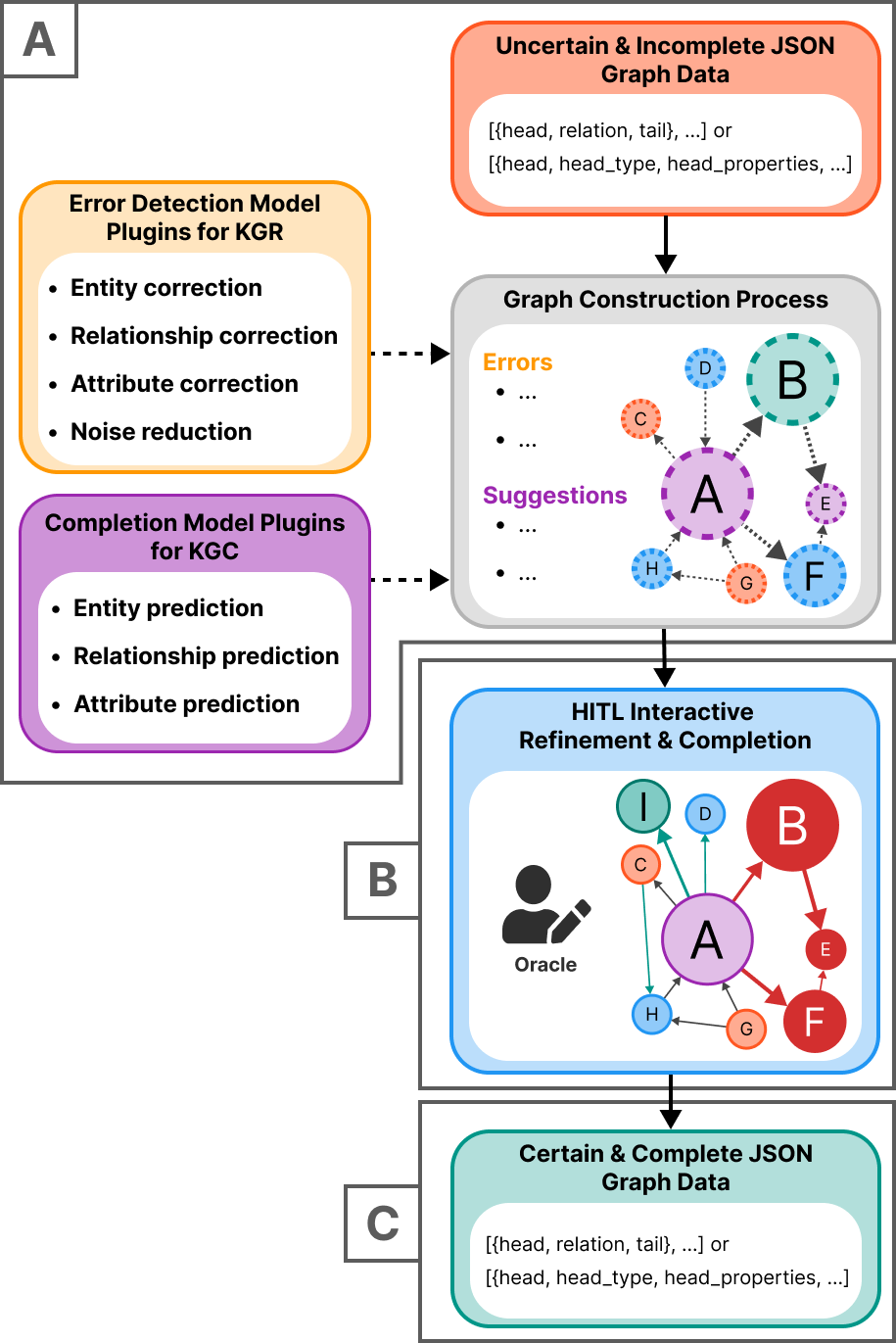
Figure 1: Schematic overview of the CleanGraph tool illustrating (A) graph data input, along with the use of optional model plugins for knowledge graph refinement (KGR) and completion (KGC), (B) the inclusion of human-in-the-loop (HITL) operations in the process, and (C) graph data output.
System Design and Architecture
Graph Interaction Model
CleanGraph is designed to support seamless user interaction with knowledge graphs through a combination of graphic and tabular representations. This tool employs a force-directed graph layout that allows users to interact with nodes and edges directly, facilitating intuitive operations such as visual parsing and detection of patterns. The use of subgraph pagination ensures the management of large graph data sets by partitioning them into manageable segments.
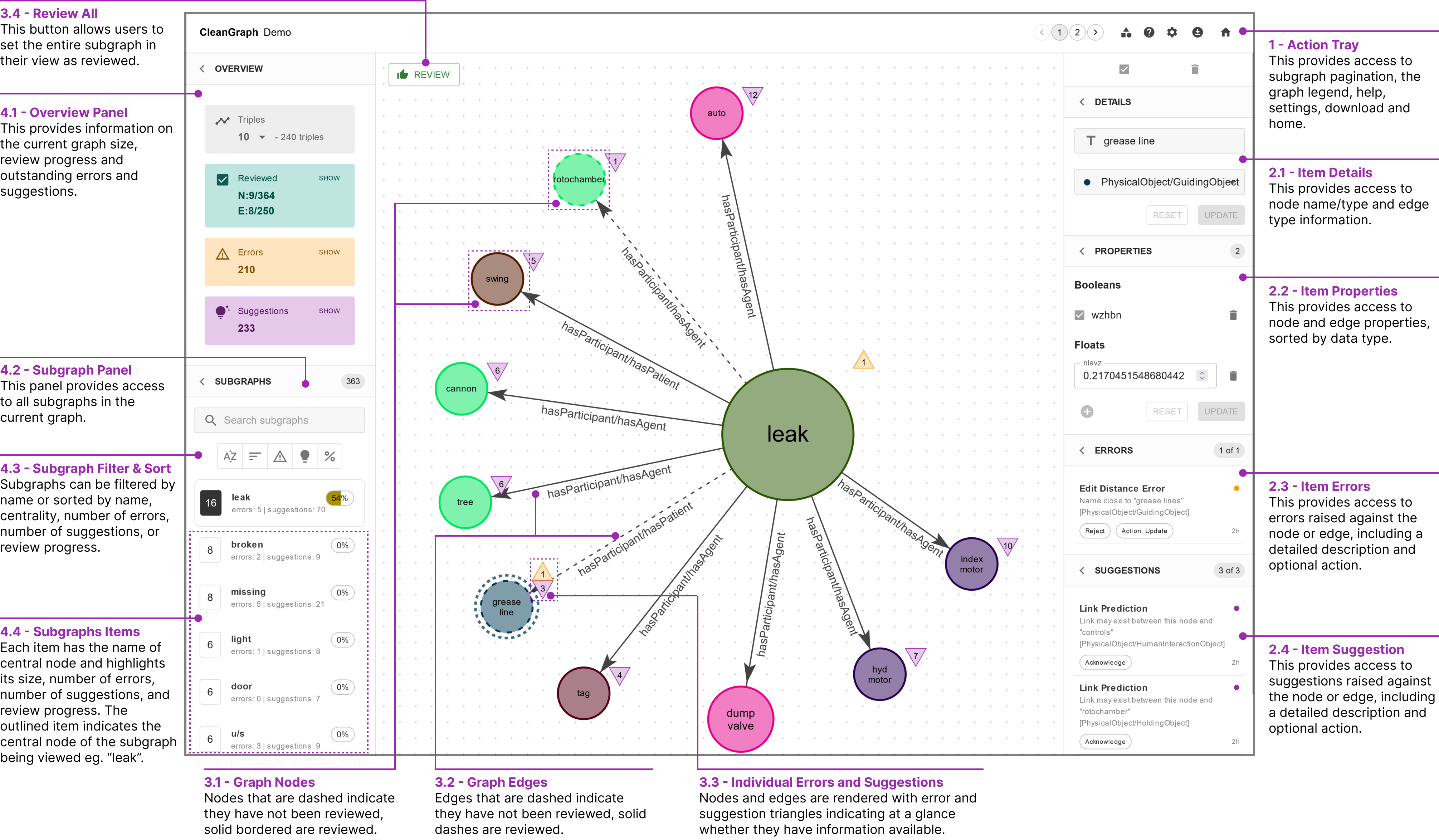
Figure 2: User interface of CleanGraph: Starting clockwise from the top right, (1) the action tray and subgraph pagination, (2) a secondary sidebar showing details, properties, errors, and suggestions for the chosen node or edge, (3) an interactive graph visualisation, and finally, (4) a primary sidebar displaying a progress overview and subgraphs.
CRUD Operations and Human-in-the-loop Features
As a key highlight, CleanGraph provides robust CRUD capabilities to accommodate extensive graph manipulations. This tool enables error detection and offers corrective actions on existing graph structures, significantly enhancing the integrity of the knowledge graph through human-in-the-loop operations. Noteworthy functions like item deletion and subgraph merging integrate seamlessly with knowledge graph completion models, fostering efficient and precise development.
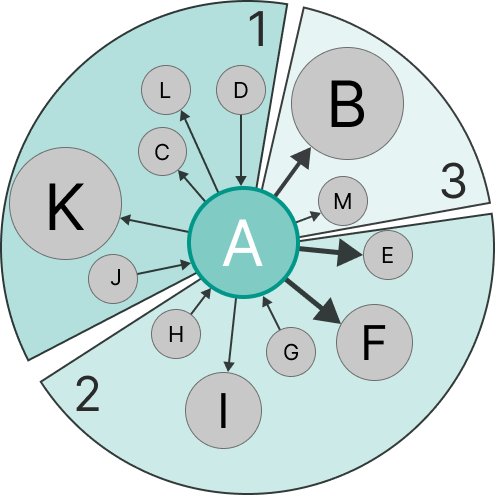
Figure 3: Illustration of CleanGraph's subgraph pagination process: A subgraph centred on the node (A) with 12 connected edges is split into 3 `pages' of 5 triples (size) for manageable viewing.
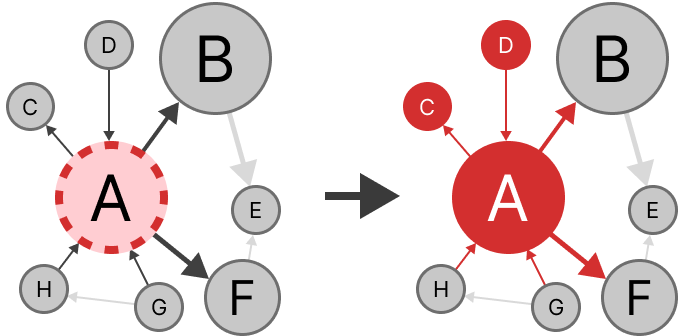
Figure 4: CleanGraph's 1-hop Item Deletion Illustrated: The removal of node (A) consequently eliminates all its corresponding edges and any nodes (C, D) that would become orphaned due to this operation.
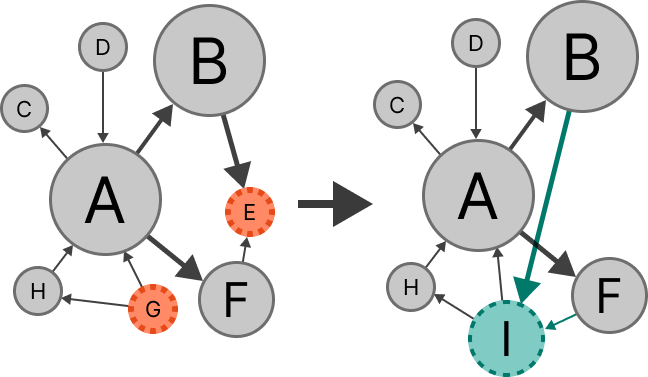
Figure 5: CleanGraph's Node Merge Illustrated: The merging of node (E) into (G) increments the node frequency and redistributes corresponding edges, resulting in a new node (I).
Plugin Architecture
Error Detection and Completion Models
CleanGraph's plugin architecture is developed to allow flexible integration of various models into the user interface. Error Detection Models (EDMs) highlight inaccuracies, while Completion Models (CMs) identify gaps in the knowledge graph. By adhering to standardized interfaces, users can effortlessly compile different models to facilitate a focused and efficient graph quality assurance process.
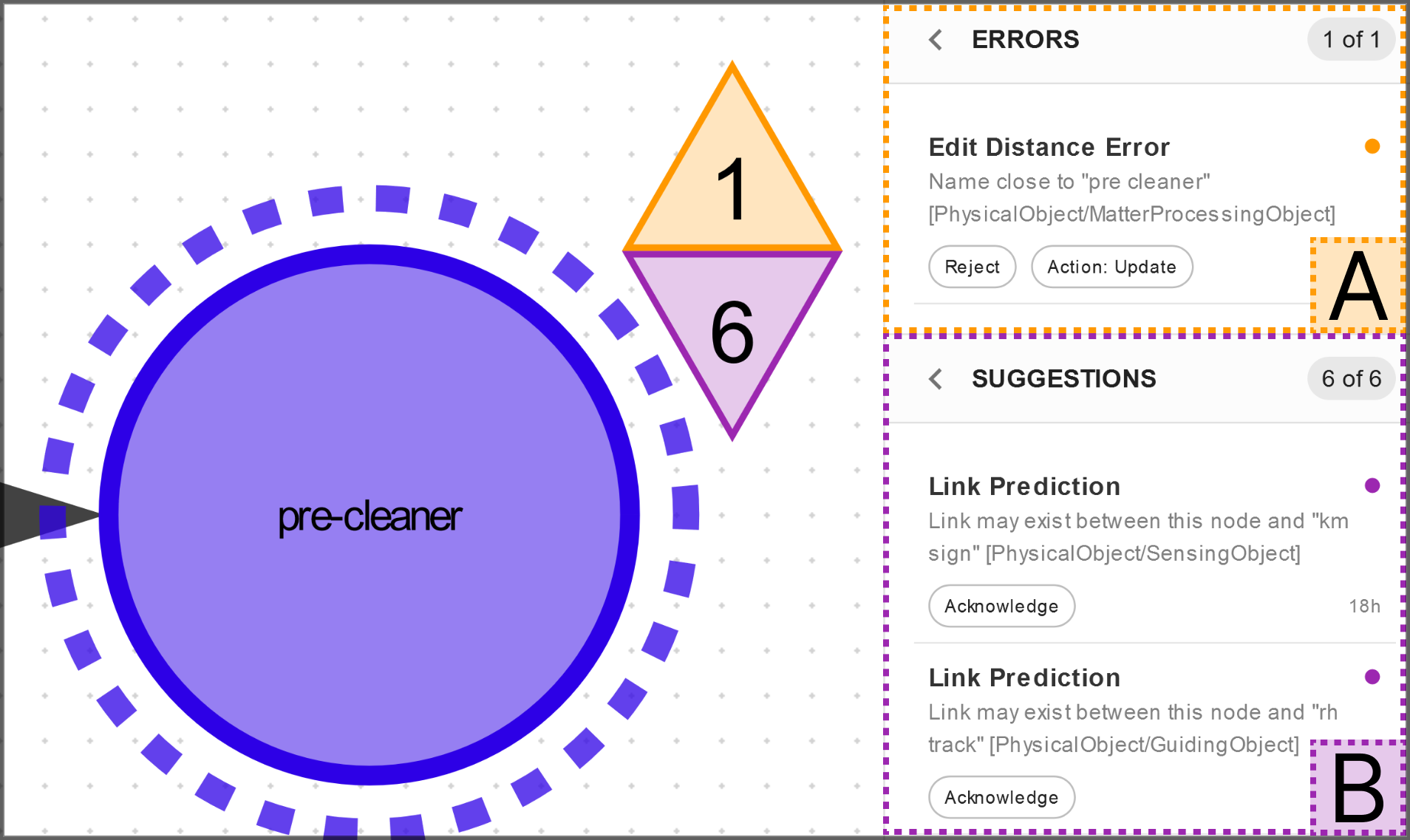
Figure 6: Display of CleanGraph's Error and Suggestion Features: (A) shows errors associated with a particular item (node), offering an optional corrective action (yellow triangle), while (B) presents informational suggestions (purple triangle). Both errors and suggestions can be acknowledged by the user.
CleanGraph differentiates itself from other knowledge graph management tools by prioritizing HITL features designed for interaction and refinement rather than scale. Unlike platforms such as AllegroGraph or Neo4J, which lack interactive refinement functionalities and largely focus on querying, CleanGraph emphasizes continuous refinement and completion processes through intuitive user interfaces and plugin integrations.
Conclusion
CleanGraph is an advanced yet user-friendly tool that facilitates comprehensive refinement and completion of knowledge graphs via human-in-the-loop operations. It effectively fills the existing gap in task-specific software by enabling interactive engagement, thorough error management, and detailed suggestions through its plugin architecture. Future developments aim to enhance error detection plugins, support semantic graph queries, and optimize performance for large-scale implementations, thereby ensuring CleanGraph’s robust applicability in diverse domains.